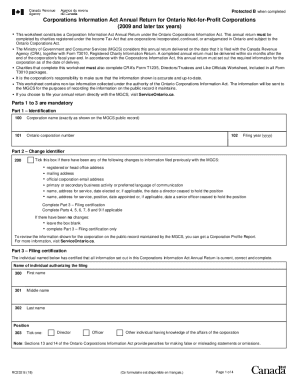
Protected B when completedCorporations Information Act Annual Return for Ontario NotforProfit Corporations (2009 and later tax years) This worksheet constitutes a Corporation Information Act Annual.
Open form follow the instructions
Easily sign the form with your finger
Send filled & signed form or save
How to fill out the Canada RC232 online
The Canada RC232 form serves as the Corporations Information Act Annual Return for Ontario Not-for-Profit Corporations. This guide will provide you with a clear and structured approach to completing this form online, ensuring accurate and timely submissions.
Follow the steps to successfully complete the Canada RC232 form online.
- Press the ‘Get Form’ button to access the Canada RC232 online form and open it in your preferred editor.
- In Part 1, enter your corporation name exactly as it appears on the Ministry of Government and Consumer Services public record. Next, input your Ontario corporation number and your filing year in the designated fields.
- Move to Part 2 to indicate any changes. If applicable, tick the box provided to note changes to your registered or head office address, mailing address, or director information. If no changes exist, leave the box blank and proceed to Part 3.
- Complete Part 3 by providing the name of the individual authorizing the filing, including their first name, middle name, last name, and position within the corporation. Ensure to select the appropriate role from the options provided.
- If there were changes in Part 2, proceed to Parts 4 through 9 to provide updated information regarding addresses, email, business activities, and director/officer details as necessary.
- In Part 4, enter the new registered or head office address, if there is an update. Double-check to ensure that the provided address does not include a post office box.
- In Part 5, indicate if your corporation's mailing address differs from the registered office. Fill out the complete mailing address if it varies.
- For Part 6, enter any new official corporation email address.
- In Part 7, provide details for any alterations regarding business activities and select the preferred language for communication.
- In Part 8, input the contact details for the person to be reached about this filing.
- Finally, fill out Part 9 with the necessary information for directors or up to five senior officers. Ensure that all relevant details, including names and addresses, are accurate and complete.
- Review all entered information to ensure correctness, then save your changes. You can download, print, or share the form as needed.
Start filling out your Canada RC232 form online today for a smooth filing experience.
Experience a faster way to fill out and sign forms on the web. Access the most extensive library of templates available.
Related content
of Canada, Ltd., Chalk River Project. Feb., 58. CRP-755 ... Atomic Energy of Canada...
Canada 800 433 3488, China 86 21 6555 7838, Czech Republic 420 224 235 774, Denmark 45 45...
Landscape, Sapphire Glass, Canada/Mexico. MP7001-LNS0P00US. Multiplane Scanner, Long...
Get answers to your most pressing questions about US Legal Forms API.
Is an annual return for Ontario corporations required?
Filing an Annual Return is a corporate law requirement. ... Foreign corporations with a licence endorsed under the Extra-Provincial Corporations Act to carry on business in Ontario must also file an Annual Return. Even small businesses not conducting business must file an Annual Return.
How do I file a T3010?
You or an authorized representative can file your charity's return online using My Business Account. You can also file a paper return. To find Form T3010 and other forms and publications, go to CRA forms and publications. You can also call Client Service at 1-800-267-2384.
What is RC232 form?
Form RC232-WS, Director/Officer Worksheet and Ontario Corporations Information Act Annual Return, is the form used by the CRA to collect corporate information for the province of Ontario only, under the Corporations Information Act.
What is annual filing return?
The annual return is a legal document that basically notifies Corporations Canada that the company is still active. ... As the annual return is a legal document, many times the company's legal team will file it as part of preparing the annual resolutions of the company.
What is Ontario annual return?
Corporations Information Act Annual Return filing datesOntario business and foreign corporations are required to file their CIA AR within six months after the end of their tax year-end. Ontario non-profit corporations are required to file their CIA AR within six (6) months after the end of their tax/fiscal year-end.
What is TF725?
Registered Charity Basic Information Sheet (TF725) Form TF725, Registered Charity Basic Information Sheet (BIS) is an important part of the information return package. ... One side has peel-off labels to attach to all documents that are part of your charity's completed information return.
What is an annual return Canada?
The annual return is a legal document that basically notifies Corporations Canada that the company is still active. They'd also like to know of any changes of the address or board of directors to keep their records up to date.
What is a T3010 form?
Canadian registered charities are required to file their T3010 Registered Charity. Information Return (commonly referred to as the T3010 ) within 6 months after their. charity s fiscal year-end.
How do I amend a T3010?
To amend your return You can submit it using My Business Account by selecting Adjust a return under your RR account, or send it by letter mail.
What is a qualified donee?
A qualified donee is an organization that can issue official donation receipts for gifts it receives from individuals and corporations. It can also receive gifts from registered charities. A qualified donee can be: a registered charity (including a registered national arts service organization) [85,646]
Use professional pre-built templates to fill in and sign documents online faster. Get access to thousands of forms.
If you believe that this page should be taken down, please follow our DMCA take down process here.