Loading
Get Nalco Vendor Registration
How it works
-

Open form follow the instructions
-

Easily sign the form with your finger
-

Send filled & signed form or save
How to fill out the Nalco Vendor Registration online
Registering as a vendor with Nalco is a crucial process for businesses looking to supply goods and services. This guide provides a detailed, step-by-step approach to completing the Nalco Vendor Registration form online, ensuring you provide all necessary information accurately.
Follow the steps to complete your vendor registration form.
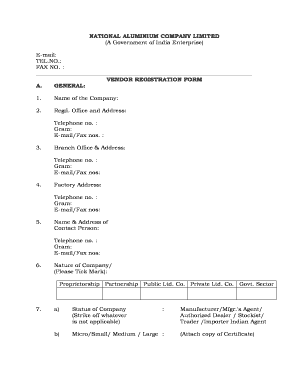
- Click ‘Get Form’ button to obtain the Nalco Vendor Registration form and open it for completion.
- Enter the name of the company in the designated field. Make sure to include the full legal name as registered.
- Provide the registered office address, including telephone numbers, email, and fax numbers. This information is essential for formal communications.
- Fill out the branch office address if applicable, along with its contact details similar to the registered office.
- Enter the factory address and its contact information, ensuring all details are correct for logistical purposes.
- Complete the contact person’s name and address along with their phone number and email for direct communication.
- Indicate the nature of the company by selecting the appropriate option such as proprietorship or partnership.
- Specify the status of the company and its classification, such as micro, small, medium, or large, along with the type of business operation.
- List the items for which registration is requested. If applicable, indicate whether any items are covered under the DGSD rate contract.
- Provide a list of important clients, attaching photocopies of 5-10 recent orders for verification.
- Enter the annual turnover for the past three years, attaching the latest audited accounts for reference.
- Detail the manufacturing facilities, listing main equipment along with their specifications.
- Answer whether your products are certified to national or international standards, providing details as necessary.
- Indicate if you have ISO certifications relevant to the products offered.
- List the inspection, measuring, and testing facilities available, including main equipment details.
- Confirm if there is a calibration system for equipment to national standards and name any technical collaborators.
- Enter your banker's name and address along with a solvency certificate for financial verification.
- Attach a copy of your GST registration certificate.
- Include the GST registration acknowledgment slip that contains the ARN.
- Attach a copy of your PAN card as part of the identification process.
- Specify the principal place of business as per GSTIN requirements.
- If applicable, provide the address of any additional place of business.
- Indicate the type of registration you seek, whether as a composite dealer or regular dealer.
- Describe the goods or items dealt with, including their GST HSN number.
- Provide details for services offered along with the GST service accounting code.
- Indicate if there are any sister concerns, providing necessary details for each.
- Confirm whether you agree to the e-payment terms before submitting the form.
- Once all sections are completed, review the information for accuracy, then save changes, download, print, or share the completed form.
Complete the Nalco Vendor Registration form online to ensure your company is registered effectively.
National Aluminium Company Limited (NALCO) is a Navratna Central Public Sector Enterprise (CPSE) under Ministry of Mines Government of India. The Company is a group `A' CPSE having integrated and diversified operations in mining metal and power. Presently Government of India holds 51.50% stake in NALCO.
Industry-leading security and compliance
US Legal Forms protects your data by complying with industry-specific security standards.
-
In businnes since 199725+ years providing professional legal documents.
-
Accredited businessGuarantees that a business meets BBB accreditation standards in the US and Canada.
-
Secured by BraintreeValidated Level 1 PCI DSS compliant payment gateway that accepts most major credit and debit card brands from across the globe.