Loading
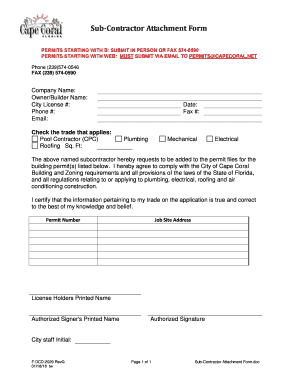
Get Cape Coral Subcontractor Form
How it works
-

Open form follow the instructions
-

Easily sign the form with your finger
-

Send filled & signed form or save
How to fill out the Cape Coral Subcontractor Form online
Filling out the Cape Coral Subcontractor Form online can streamline your application process for permits. This guide provides step-by-step instructions to help you navigate each section of the form efficiently.
Follow the steps to complete your form accurately.
- Click ‘Get Form’ button to obtain the form and open it in the editor.
- Begin by entering your company name in the designated field at the top of the form. Ensure that the name exactly matches your business's official registration.
- Enter the name of the owner or builder in the specified section. This should be the individual responsible for the application.
- Provide your city license number in the relevant field. This number authenticates your licensed status with the city.
- Fill in your contact information, including your phone number and email address, ensuring both are accurate for follow-up communication.
- Select the appropriate trade that applies to your services by checking one of the boxes, such as pool contractor, plumbing, mechanical, electrical, or roofing. If applicable, include the square footage for roofing work.
- Indicate the date by which you are submitting the form in the date field.
- If applicable, provide the fax number where you can be reached.
- In the section stating your request to be added to the permit files, ensure you read the compliance statement regarding the City of Cape Coral Building and Zoning requirements and laws of Florida.
- Input the permit number corresponding to the job site in the indicated area.
- Provide the job site address where the work will be performed.
- Enter the printed name of the license holder responsible for the project.
- Have the authorized signer print their name in the designated field, followed by their signature to validate the submission.
- Lastly, ensure the form is reviewed for accuracy and completeness before saving your changes. You can then download, print, or share the completed document as necessary.
Complete your documents online to save time and ensure accuracy.
Minimum processing time for applications (initial reviews) is three (3) business days. Completed applications must be emailed to CORequest@capecoral.net with the permit number in the subject line of the email.