Loading
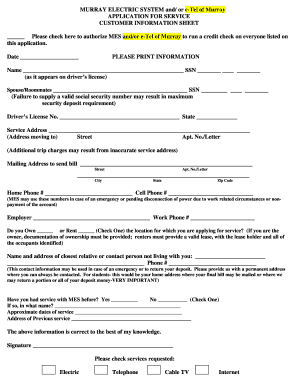
Get Mes Application With E-tel - Murray Electric System - Www2 Murray-ky
How it works
-

Open form follow the instructions
-

Easily sign the form with your finger
-

Send filled & signed form or save
How to fill out the MES Application With E-Tel - Murray Electric System online
Filling out the MES Application is an important process for establishing electric, telephone, cable TV, and internet services. This guide will walk you through each section of the application to ensure that you can complete it accurately and efficiently.
Follow the steps to accurately complete your application.
- Click ‘Get Form’ button to obtain the form and open it for editing.
- Begin by filling out the customer information sheet. Provide your full name as listed on your driver's license along with your Social Security number. Be careful to enter this information accurately, as a valid Social Security number is necessary to avoid potential security deposit issues.
- Next, if applicable, include the name and Social Security number of your spouse or any roommates. Ensure that you check the box to authorize MES and/or e-Tel of Murray to perform a credit check on all individuals listed.
- Input your driver's license number and the state it was issued in. This identification is vital for the verification process.
- Enter your service address, which is the location you are moving to. Make sure to provide an accurate address as incorrect information may lead to extra charges.
- If your mailing address differs from your service address, please provide it in the designated field. This address will be used for billing purposes.
- List your home and cell phone numbers. These will be used for important communications regarding your account, including emergencies or potential service disconnections.
- Fill in your employer's name and work phone number. This information can assist in verifying your account.
- Indicate whether you own or rent the residence by checking the appropriate box. If you own the property, you will need to supply documentation of ownership; if you rent, a valid lease must be included.
- Provide the name and contact information of a closest relative or a contact person not living with you. This information is crucial in cases of emergencies or to return your deposit.
- Indicate if you have previously had service with MES by checking 'Yes' or 'No' and, if applicable, include the name, approximate dates of service, and address of your previous service.
- Review all the completed information for accuracy, ensuring everything entered is correct to the best of your knowledge.
- Sign the application to validate your information and proceed to select the services you are requesting: Electric, Telephone, Cable TV, Internet.
- Finally, save the completed application. You can download, print, or share the form as necessary.
Complete your MES Application online today for prompt service activation!
Coal-fired power plants account for nearly all of West Virginia's electricity generation, and the 10 largest power plants in the state, by capacity, are coal-fired.