Loading
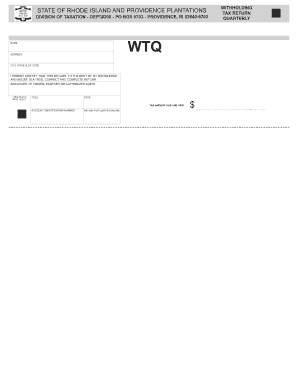
Get Wtq - Rhode Island Division Of Taxation
How it works
-

Open form follow the instructions
-

Easily sign the form with your finger
-

Send filled & signed form or save
How to fill out the WTQ - Rhode Island Division Of Taxation online
Completing the WTQ form for the Rhode Island Division of Taxation is essential for reporting withholding tax accurately. This guide provides clear instructions to assist you in filling out the form correctly and efficiently.
Follow the steps to successfully fill out the WTQ form online.
- Press the ‘Get Form’ button to access the WTQ form and open it in the editor.
- Begin by entering your name in the designated field, ensuring it accurately reflects the account holder's name.
- In the address section, provide your complete address, including street number and name.
- Fill in the city, state, and ZIP code information in the respective fields for complete accuracy.
- Review the certification statement regarding the accuracy of the return; this assures that the information provided is true to the best of your knowledge.
- Sign the form in the section provided, using the signature of the owner, partner, or authorized agent.
- Include your title in the field next to your signature, to clarify the capacity in which you are signing.
- Enter the date of signing the form in the designated date field.
- Ensure you fill in your account identification number, which is necessary for processing your return.
- Specify the quarter ending date for which you are filing this return to ensure it corresponds with the correct tax period.
- Indicate the tax amount due and paid in the section provided, entering the total dollar amount appropriately.
- After filling out all fields, save your changes. You can also download, print, or share the form as needed.
Complete your WTQ form online now for seamless processing.
Related links form
You do not need to send copies of your state returns with your Federal return. Many states require that you send a copy of your Federal return with your state return. TT will usually print out the Federal return with the state return if this is needed. Yes, you can staple your W-2 to your return.
Industry-leading security and compliance
US Legal Forms protects your data by complying with industry-specific security standards.
-
In businnes since 199725+ years providing professional legal documents.
-
Accredited businessGuarantees that a business meets BBB accreditation standards in the US and Canada.
-
Secured by BraintreeValidated Level 1 PCI DSS compliant payment gateway that accepts most major credit and debit card brands from across the globe.