Loading
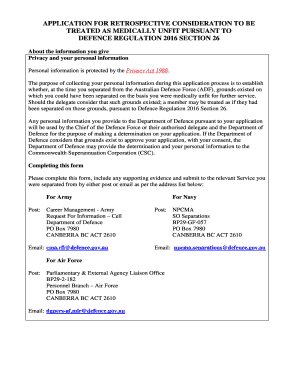
Get Application Request For Retrospective Consideration To Be Treated As Medically Unfit Under Defence
How it works
-

Open form follow the instructions
-

Easily sign the form with your finger
-

Send filled & signed form or save
How to fill out the APPLICATION REQUEST FOR RETROSPECTIVE CONSIDERATION TO BE TREATED AS MEDICALLY UNFIT UNDER DEFENCE online
This guide offers a clear and supportive approach to completing the Application Request for Retrospective Consideration to be Treated as Medically Unfit Under Defence. It will assist users in navigating the process effectively and ensure that all necessary information is included.
Follow the steps to complete your application accurately.
- Press the ‘Get Form’ button to access the form. Once clicked, the form will open in your editor for filling out.
- In the first section, indicate whether you are representing yourself or if someone else is assisting you. If you select 'No', provide your representative’s details, including their full name, contact numbers, email address, and postal address.
- Complete the personal details section. Enter your last name, first name, any other names, former last names (if applicable), date of birth, home and mobile phone numbers, postal address, and email address.
- Fill out the service details. Specify your branch of service (Army, Navy, or Air Force), all periods of service (including regular and reserve), service numbers, date of separation (if known), rank on separation, and reason for separation (if known).
- Detail the medical condition(s) that existed during your service and at the time of separation. Include diagnosis dates if known and specify how these conditions affected your employment.
- Indicate whether you have sought treatment for the condition(s). If applicable, include details on when you first sought treatment and if the treatment is ongoing.
- Attach any relevant medical or psychological information to support your application. This may include records, documents, or reports.
- Provide any additional evidence or information to support your application, such as statutory declarations or claims from the Department of Veterans' Affairs.
- Sign the release authority and certification section, authorizing the release of your medical, psychological, service, and personnel records to the Department of Defence. Make sure to initial and sign as required.
- Verify your identity using certified documents as outlined. Provide clear and legible documents totaling at least 100 points, ensuring compliance with the certification guidelines.
- Once you have completed all sections, review your application for accuracy. Save your changes, download a copy for your records, and submit the application via post or email to the relevant Service address provided in the form.
Begin your application process online today and ensure all necessary documentation is provided for a smooth review.
In specific circumstances, you can apply to leave the Permanent Forces without performing Reserve service. Many of the benefits you're eligible for are the same as if you transfer to the Reserves. If you're discharged from the Permanent Forces for disciplinary reasons, you won't get any benefits.
Industry-leading security and compliance
US Legal Forms protects your data by complying with industry-specific security standards.
-
In businnes since 199725+ years providing professional legal documents.
-
Accredited businessGuarantees that a business meets BBB accreditation standards in the US and Canada.
-
Secured by BraintreeValidated Level 1 PCI DSS compliant payment gateway that accepts most major credit and debit card brands from across the globe.