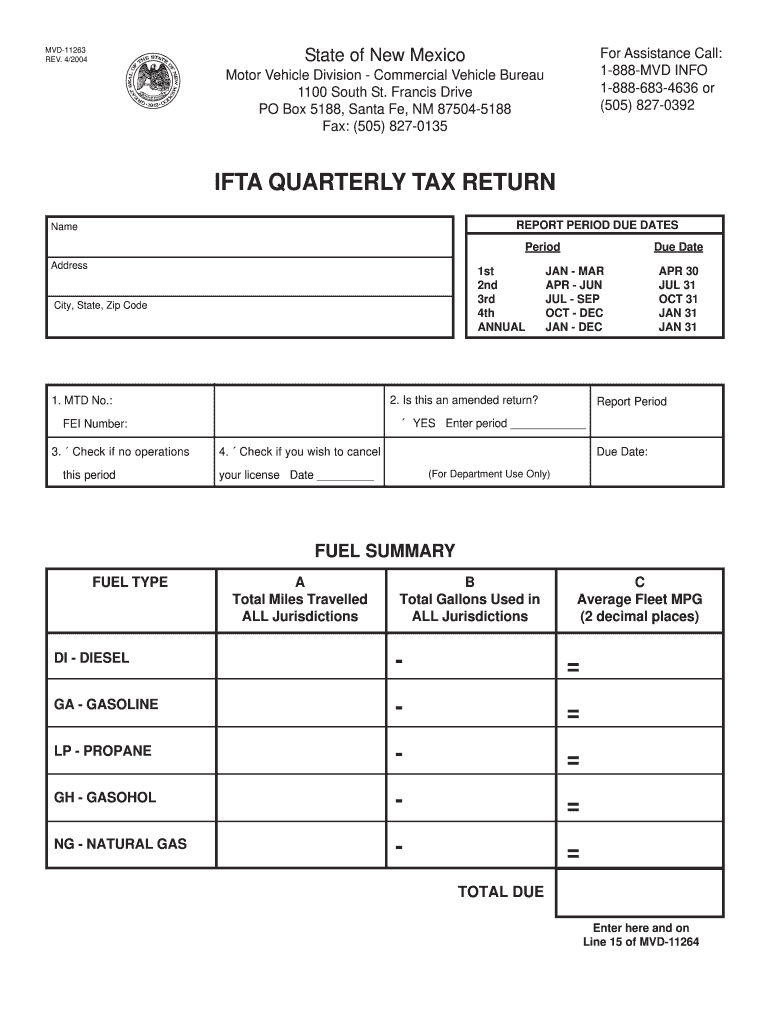
Ox 5188, Santa Fe, NM 87504-5188 Fax: (505) 827-0135 IFTA QUARTERLY TAX RETURN REPORT PERIOD DUE DATES Name Period Address 1st 2nd 3rd 4th ANNUAL City, State, Zip Code APR 30 JUL 31 OCT 31 JAN 31 JAN 31 Report Period YES Enter period FEI Number: this period JAN - MAR APR - JUN JUL - SEP OCT - DEC JAN - DEC 2. Is this an amended return? 1. MTD No.: 3. Check if no operations Due Date 4. Check if you wish to cancel Due Date: (For Department Use Only) your lic.

Open form follow the instructions

Easily sign the form with your finger

Send filled & signed form or save
How to fill out the New Mexico IFTA Login online
This guide provides clear and supportive instructions for users on how to complete the New Mexico IFTA Login form online. By following these steps, you will efficiently navigate the form and ensure your compliance with state requirements.
Follow the steps to successfully complete your IFTA login.
- Click ‘Get Form’ button to obtain the form and open it in the editor.
- Begin by entering your name in the designated field. Ensure that it matches the name associated with your account for accurate processing.
- Next, provide your address, including city, state, and zip code. This information is crucial for identification and communication purposes.
- Select the report period by checking the corresponding box for either the 1st, 2nd, 3rd, or 4th quarter or select 'Annual.' Ensure the period reflects the time frame for which you are reporting.
- Enter your FEI number in the appropriate field. This unique identifier is necessary for tax processing.
- Indicate if this is an amended return by checking the designated box if applicable.
- If your vehicle had no operations during this period, check the box indicating this status.
- If you wish to cancel your license, check the appropriate box and provide the date. This step is for department use only, so ensure accuracy.
- In the fuel summary section, report the total miles travelled, total gallons used, and average fleet MPG for each fuel type: diesel, gasoline, propane, gasohol, and natural gas.
- Finally, calculate and enter the total due in the designated field. Make sure this amount is also reflected on Line 15 of the MVD-11264 form.
- Review all provided information for accuracy before finalizing your submission. After confirming the details, save changes, download, print, or share the completed form as needed.
Complete your New Mexico IFTA Login online today and ensure your filings are up to date.
Experience a faster way to fill out and sign forms on the web. Access the most extensive library of templates available.
Related content
The New Mexico Commercial Vehicle Bureau is responsible for the licensing and registration...
by D Cathey · 2014 — New Mexico Motor Transport Police Department (MTPD). ... Agreement...
The International Association of Sound and Audiovisual Archives (IASA) was established in...
Get answers to your most pressing questions about US Legal Forms API.
Where is my NM tax return?
Go to the Department website at www.tax.newmexico.gov. Near the center of the page, click Where is my refund? Then enter your ID (social security number) and refund amount to see the status. Before calling about your refund, please allow time for the Department to process your refund claim.
How do I file an IFTA in New Mexico?
For information regarding IFTA reporting call (505) 827-0392 or Toll Free 1-888-MVD-INFO or 1-888-683- 4636. Each IFTA licensee must file a quarterly tax report on a form furnished by the New Mexico Taxation & Revenue Department and pay any balance of tax due.
Can I pay New Mexico taxes online?
Pay Online Making a payment online is fast, easy and free. If you pay at the time you file, you can use New Mexico WebFile or if you would like to pay after you have filed your return, you can use Taxpayer Access Point (TAP). You can use an electronic check or credit card when making a payment.
How do I find my nm CRS number?
If you've run payroll in New Mexico in the past, you can find your CRS Identification Number on Form CRS-1, as well as other notices received from the New Mexico Taxation & Revenue Department. If you're unsure of your number, you should call the agency at (505) 827-0700.
How do I get a NM CRS number?
To contact the IRS, call 1-800-829-4933, or go to FEIN. There is no fee to register or obtain a CRS identification number. You can return your forms to any district tax office or register online and receive a CRS identification number immediately. Applications submitted by mail are processed within one to two weeks.
Can I pay my NM state taxes online?
Pay Online Making a payment online is fast, easy and free. If you pay at the time you file, you can use New Mexico WebFile or if you would like to pay after you have filed your return, you can use Taxpayer Access Point (TAP). You can use an electronic check or credit card when making a payment.
How do I pay my New Mexico income tax?
You may pay taxes over the internet with Visa, MasterCard, Discover or American Express cards. A convenience fee covers the costs that the companies bill the state when a credit card is used. There is no charge if you pay by electronic check.
How do I get a New Mexico tax ID number?
To contact the IRS, call 1-800-829-4933, or go to FEIN. There is no fee to register or obtain a CRS identification number. You can return your forms to any district tax office or register online and receive a CRS identification number immediately. Applications submitted by mail are processed within one to two weeks.
How do I file my New Mexico state taxes?
You may choose to file electronically through your tax preparer or by using approved software on a personal computer. Individuals who both file and pay their income tax electronically using our website, a personal computer or a tax professional have an extended filing deadline of April 30.
What is CRS taxes in New Mexico?
Combined Reporting System, ( CRS ) is the Department's method for reporting the state's major business taxes: gross receipts tax, all local option gross receipts taxes, compensating tax, and withholding tax. The CRS identification number is your state tax identification number.
Use professional pre-built templates to fill in and sign documents online faster. Get access to thousands of forms.
If you believe that this page should be taken down, please follow our DMCA take down process here.