Loading
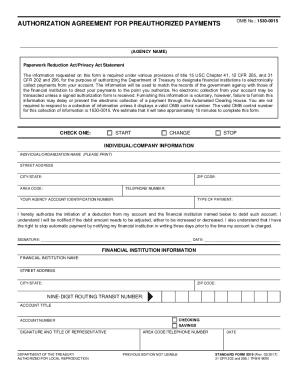
Get Clear Spring Health Pay Online
How it works
-

Open form follow the instructions
-

Easily sign the form with your finger
-

Send filled & signed form or save
How to fill out the Clear Spring Health Pay Online online
This guide provides comprehensive and supportive instructions on how to complete the Clear Spring Health Pay Online form. By following these steps, you will be able to authorize the electronic deduction of your monthly premium from your bank account with confidence.
Follow the steps to successfully fill out the Clear Spring Health Pay Online form.
- Click the ‘Get Form’ button to acquire the Clear Spring Health Pay Online form. This will allow you to open the document in an appropriate editor.
- Begin filling out the form with basic information. Ensure that you have your Member ID Card and a blank check from your bank account on hand for reference.
- In the ‘Agency Name’ field, enter 'Clear Spring Health'.
- For the ‘Individual/Organization Name’, write your name exactly as it appears on your Member ID card.
- Input your 9-character Member ID in the ‘Agency Account Identification Number’ section.
- Choose ‘Plan Premiums’ for the ‘Type of Payment’.
- Locate the nine-digit number at the bottom left corner of your check and enter it in the ‘Nine-Digit Routing Number’ field.
- Fill in the ‘Account Title’ with the name of the person who holds the checking or savings account.
- Enter your checking or savings account number in the ‘Account Number’ section, omitting any spaces or symbols.
- Complete the ‘Signature and Title of Representative’ field only if a bank representative assists you with the form.
- Attach a blank, voided check to the form for validation purposes once all fields are completed.
- Send the completed form to the designated address: Clear Spring Health, P.O. Box 4016, Scranton, PA 18505.
- After submitting the form, be aware that it may take up to three months for the automatic deductions to begin. Until then, continue to pay your premiums by check or money order.
- You may save any changes made to the form and choose to download, print, or share it as needed.
Complete your Clear Spring Health Pay Online form today to streamline your premium payments!
Related links form
Annual Consent Form Proposal - LEMC - Lemconline
Subordinate Chapter Audit Report - Jerusalem Grand Chapter Of ... - Jgc-oesphafl
Name: Date: Period: Informational Text Graphic Organizer Author: Title: Central Idea: Supporting
Workbook - Balham Seventh-day Adventist Church - Balham Adventistchurch Org
We will notify you of your effective date after we get this form from you. Instead of sending a disenrollment request to Clear Spring Health you can call 1-800- MEDICARE (1-800-633-4227), 24 hours a day, 7 days a week, to disenroll by telephone. TTY users should call 1-877-486-2048.