Loading
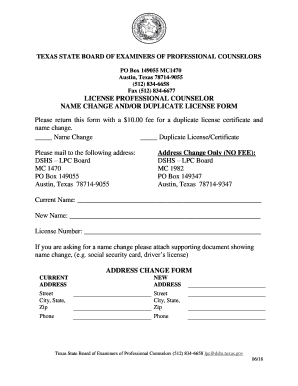
Get Lpc- Name Change And/or Duplicate License Form - Texas.gov
How it works
-

Open form follow the instructions
-

Easily sign the form with your finger
-

Send filled & signed form or save
How to use or fill out the LPC- Name Change And/or Duplicate License Form - Texas.gov online
Filling out the LPC- Name Change And/or Duplicate License Form online can be a straightforward process when you have the right guidance. This guide provides a step-by-step approach to help you complete the form accurately.
Follow the steps to fill out the LPC form online.
- Click ‘Get Form’ button to obtain the LPC- Name Change And/or Duplicate License Form and access it in the online editing tool.
- Indicate your request for either a name change or a duplicate license by checking the appropriate box.
- Enter your current name in the designated field. Ensure that the name matches the one on your existing license.
- If applying for a name change, provide your new name in the specified field and attach any required supporting documents, such as a social security card or driver’s license, that verify the name change.
- Fill in your license number to help the processing team identify your application quickly.
- Complete the address change section if applicable. Provide your current address and the new address you wish to update.
- Include your phone number for any follow-up communications.
- Review all entered information for accuracy and completeness.
- Once satisfied, proceed to save the changes and options to download, print, or share the filled-out form.
Complete your LPC form online today to ensure a smooth processing experience.
Related links form
Direct client contact hours include face to face counseling experiences in individual, group, couples and family counseling. A few other activities are counted as direct, and your Internship professor will discuss this in greater detail.