Loading
Get Kp Forms
How it works
-

Open form follow the instructions
-

Easily sign the form with your finger
-

Send filled & signed form or save
How to fill out the Kp Forms online
Filling out Kp Forms online can seem daunting, but with the right guidance, it becomes a straightforward process. This comprehensive guide will walk you through each step and section, ensuring that your form is filled out correctly and efficiently.
Follow the steps to easily complete your Kp Forms online.
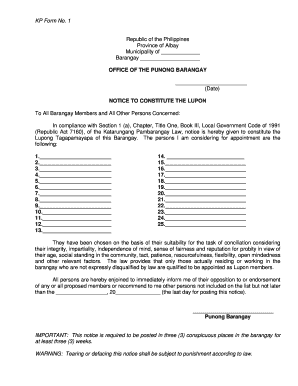
- Press the ‘Get Form’ button to acquire the form and open it in the editor, making it accessible for online filling.
- Identify the municipality and province. In the designated fields, enter the name of the municipality and province as listed in your documents.
- Fill in the barangay information. This is critical for identification and should be done with precision to avoid any issues.
- In the notice section, input the date you are completing the form.
- Provide the names of the appointed members in the specific fields. Ensure that all names are clearly written to avoid confusion.
- Review the justifications for each appointment. This may include integrity, impartiality, and other relevant factors associated with each candidate.
- Complete the section where you provide the deadline for public endorsement or opposition to the proposed members, making sure the date is accurate.
- Finally, conclude the filling process by including the signature of the Punong Barangay and the date of issuance. Check if you need to attest the document.
- Save any changes you have made, and download a copy for your records. You can also print or share the completed form as necessary.
Complete your Kp Forms online today and streamline your document management!
Standard medical record request Download, complete, and email the authorization to disclose health information (PDF) to KPCOReleaseofInfo@kp.org. Fax the completed form to 303-404-4750.