Loading
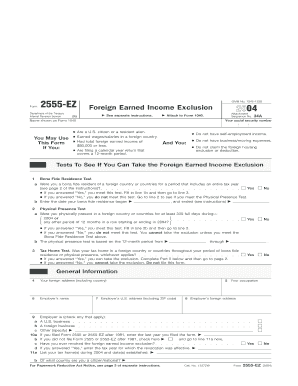
Get 2004 Form 2555-ez - Irs - Irs
This website is not affiliated with IRS
How it works
-

Open form follow the instructions
-

Easily sign the form with your finger
-

Send filled & signed form or save
How to fill out the 2004 Form 2555-EZ - IRS online
Filling out the 2004 Form 2555-EZ online allows you to claim the foreign earned income exclusion, simplifying your tax responsibilities. This guide provides clear, step-by-step instructions to help you accurately complete the form.
Follow the steps to complete your 2004 Form 2555-EZ online.
- Press the ‘Get Form’ button to access the form and open it in your preferred online editor.
- Begin by entering your name as it appears on Form 1040 and your social security number in the designated fields. Ensure that all information is accurate.
- In Part I, confirm eligibility by answering questions regarding your residency status and income. Check 'Yes' or 'No' for both the bona fide residence test and the physical presence test, and provide the necessary dates.
- Proceed to Part II. Fill in your foreign address, employer details, and occupation. If applicable, indicate whether you have ever revoked the foreign earned income exclusion.
- In Part III, provide information on your presence in the United States. Record the dates you arrived and left the U.S., along with any income earned while present.
- Finally, calculate your foreign earned income exclusion in Part IV. Enter your maximum exclusion amount, the number of qualifying days, and follow the instructions to compute your total exclusion.
- Review your entries for accuracy, then save your changes. You can download, print, or share the completed form as needed.
Start completing your tax documents online today for a smoother filing experience.
Form 2555. ... Form 2555 shows how you qualify for the bona fide residence test or physical presence test, how much of your foreign earned income is excluded, and how to figure the amount of your allowable foreign housing exclusion or deduction.