Loading
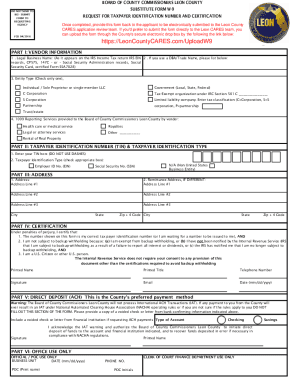
Get Leon County Cares W9
How it works
-

Open form follow the instructions
-

Easily sign the form with your finger
-

Send filled & signed form or save
How to fill out the Leon County Cares W9 online
Completing the Leon County Cares W9 form is an essential step for vendors providing services to the Board of County Commissioners in Leon County. This guide will help you navigate the online process with clarity and confidence.
Follow the steps to accurately fill out your W9 form online.
- Press the ‘Get Form’ button to access the form and open it in the editor.
- In Part I, enter your legal business name as it appears on IRS records. If you operate under a different name, fill in your DBA or trade name.
- Select the entity type by checking the appropriate box for your business structure. Make sure to only select one option.
- Indicate the type of services you provide by checking the corresponding box under 1099 reporting. If your service is not listed, you can leave this section blank.
- In Part II, provide your taxpayer identification number (TIN) without dashes. Choose the appropriate identification type by checking the corresponding box.
- For Part III, enter your correspondence address where you wish to receive payments and relevant documents. If this is different from your business address, fill out the remittance address section.
- In Part IV, review the certification statement and confirm that the information provided is accurate. Sign and date the form clearly, including your printed name and title.
- If opting for direct deposit in Part V, complete the required fields and provide a voided check or a letter from your bank with the necessary banking information.
- After completing all sections, save your changes. You can then download, print, or share the form as required.
Complete your Leon County Cares W9 form online today to facilitate timely processing.
Applying is easy! Simply visit the Leon CARES Act Portal here or contact our Office to speak with a Business Consultant at 1-850-599-3407.