Loading
Get Idnyc Renewal
How it works
-

Open form follow the instructions
-

Easily sign the form with your finger
-

Send filled & signed form or save
How to fill out the Idnyc Renewal online
This guide provides clear and supportive instructions for filling out the Idnyc Renewal form online. By following these steps, users can easily navigate each section of the application to successfully renew their IDNYC card.
Follow the steps to complete your Idnyc Renewal application.
- Press the ‘Get Form’ button to access the Idnyc Renewal form and open it in your preferred editor.
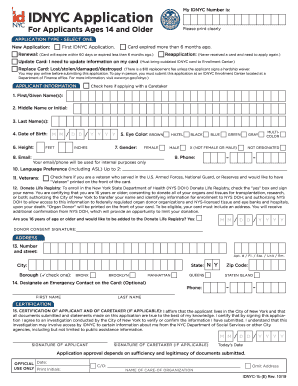
- Select the application type. Indicate whether this is a renewal, update, reapplication, or replacement request based on your current situation.
- Fill in the applicant information section clearly. Provide your first name, middle name or initial, last name, date of birth, height, eye color, phone number, and email. Ensure that the information is accurate and updates any necessary details.
- Choose your language preference and indicate if you are a veteran. If applicable, check the box to indicate participation in the Donate Life Registry and provide a consent signature.
- Enter your current address, including street number and name, apartment number, city, state (New York), borough, and zip code. This must be accurate to receive your card.
- Designate an emergency contact, if desired, providing their first and last name and phone number.
- Complete the certification. Sign and date the application, affirming that the information provided is true to the best of your knowledge.
- Review the form for accuracy and completeness. Make any necessary adjustments before finalizing your application.
- Save your changes, then choose to download, print, or share the finalized Idnyc Renewal form as needed.
Start your Idnyc Renewal application online today for a seamless experience.
You can renew your card either online or in person at an Enrollment Center. To renew online, visit the Online Portal and follow the instructions to begin your application. To renew in person, visit an Enrollment Center. You can make an appointment online or by calling 311.