Loading
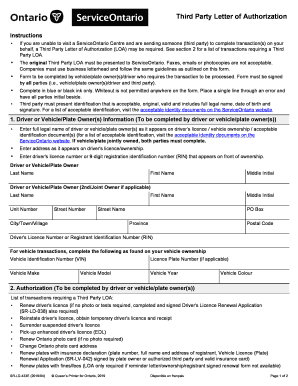
Get Letter Of Authorization Service Ontario
How it works
-

Open form follow the instructions
-

Easily sign the form with your finger
-

Send filled & signed form or save
How to fill out the Letter Of Authorization Service Ontario online
This guide provides comprehensive instructions on how to complete the Letter of Authorization for Service Ontario online. By following these steps, users can ensure that the form is filled out correctly and submitted without any issues.
Follow the steps to successfully complete the form online.
- Click the ‘Get Form’ button to obtain the form, allowing you to access it in the online editor.
- Fill in the driver or vehicle/plate owner's information. This includes the full legal name, address, driver's license or registration identification number, and, if applicable, the details of a second joint owner.
- Complete the authorization section, specifying the transactions you authorize your third party to conduct on your behalf, referring to the listed transactions provided.
- Gather the necessary signatures. Ensure that the driver, vehicle/plate owner(s), and the third party sign and date the form appropriately.
- Once all fields are accurately filled and signatures obtained, save any changes made. You can then download, print, or share the completed form as needed.
Complete your Letter of Authorization online today!
The authorization to access employment and income history from federal or state records, including SESA records, for this transaction continues in effect for one (1) year unless limited by state law, in which case the authorization continues in effect for the maximum period, not to exceed one (1) year, allowed by law.