Loading
Get Authentications Cover Letter For Website (updated July 2018).docx
How it works
-

Open form follow the instructions
-

Easily sign the form with your finger
-

Send filled & signed form or save
How to fill out the Authentications Cover Letter For Website (updated July 2018).docx online
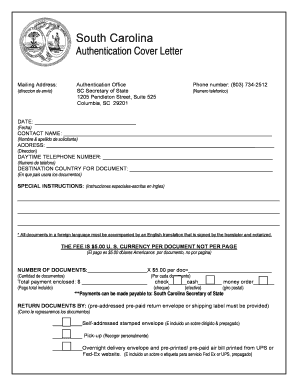
Filling out the Authentications Cover Letter For Website is a straightforward process that ensures your documents are properly authenticated for use in another country. This guide will provide clear, step-by-step instructions to help you navigate each section of the form with confidence.
Follow the steps to complete the form accurately.
- Click ‘Get Form’ button to obtain the form and open it in the editor.
- Fill in the 'Date' field with the current date, ensuring it is formatted correctly.
- Enter the contact name in the respective field, including first and last name.
- Provide your complete mailing address in the designated section.
- Input a daytime telephone number where you can be reached during business hours.
- Specify the destination country where you will use the documents in the appropriate field.
- Include any special instructions in the dedicated space to clarify any unique requirements or requests.
- Indicate the number of documents you are submitting for authentication and calculate the total fee based on the rate of $5.00 per document.
- Select your preferred method of payment and fill in the total payment enclosed.
- Choose how you want the documents returned to you, ensuring you provide the necessary pre-addressed, pre-paid envelope or shipping label.
- Once all sections are completed, review your entries for accuracy, then save, download, print, or share the completed form as needed.
Start filling out your documents online today for a seamless authentication process.