Loading
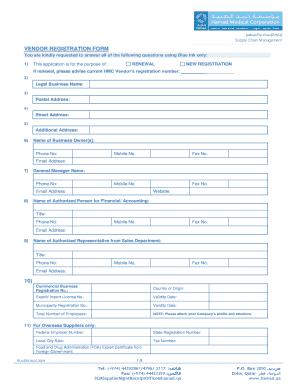
Get Hmc Vendor Registration
How it works
-

Open form follow the instructions
-

Easily sign the form with your finger
-

Send filled & signed form or save
How to fill out the Hmc Vendor Registration online
This guide provides a comprehensive overview of how to complete the Hmc Vendor Registration form online. By following these steps, users can ensure that all required information is accurately submitted, facilitating a smooth registration process.
Follow the steps to effectively complete your registration.
- Press the ‘Get Form’ button to access and open the registration form for editing.
- Indicate the purpose of the application by selecting either 'Renewal' or 'New Registration.' If you are renewing your registration, please provide your current HMC Vendor’s registration number.
- Fill in the 'Legal Business Name' field with your official business name.
- Provide your 'Postal Address,' which should include the city, state, and zip code.
- Complete the 'Street Address' section where your business is physically located.
- If applicable, fill in any 'Additional Address' information that may assist in identifying your business location.
- Enter the 'Name of Business Owner(s),' along with their phone number, mobile number, and fax number.
- Provide the email address for the business owner or representative.
- Input the details of the 'General Manager,' including their name, phone number, and email address.
- Include your company's website URL, if available.
- List the authorized person for financial/accounting matters along with their contact information.
- Fill out the information for the authorized representative from the sales department. Include their name, title, and contact information.
- Complete the section concerning commercial registrations by entering the necessary registration numbers and validity dates.
- Fill out the total number of employees in your organization.
- For overseas suppliers, provide relevant federal and local registration details as requested.
- Answer the question regarding your relationship to any employees of relevant organizations. Fill in designated spaces if your answer is yes.
- Select the category of items your business qualifies to supply, ensuring you are familiar with the associated fees.
- Indicate the legal status of your company, providing all necessary documentation as outlined.
- Complete the financial payment details, ensuring that your bank information is accurate and the necessary IBAN is included.
- Answer whether your business provides online ordering capabilities.
- Indicate whether you maintain engineers and provide details regarding your storage and warehousing facilities.
- Complete the section regarding the name and type of your business, along with any manufacturers you represent.
- Ensure all required documentation is attached before submitting the application.
- Upon completing all sections, save your changes, download or print the form, and share if necessary.
Start your Hmc Vendor Registration online today to ensure a seamless registration process.
Related links form
Please attach Patient's passport copy, Medical report and Clinical referral Attach Patient's passport copy * Please make sure that you do not exceed the upload limit of 2 MB. ... Attach Patient's medical report * Please make sure that you do not exceed the upload limit of 2 MB. ... Attach Patient's clinical referral *
Industry-leading security and compliance
US Legal Forms protects your data by complying with industry-specific security standards.
-
In businnes since 199725+ years providing professional legal documents.
-
Accredited businessGuarantees that a business meets BBB accreditation standards in the US and Canada.
-
Secured by BraintreeValidated Level 1 PCI DSS compliant payment gateway that accepts most major credit and debit card brands from across the globe.