Loading
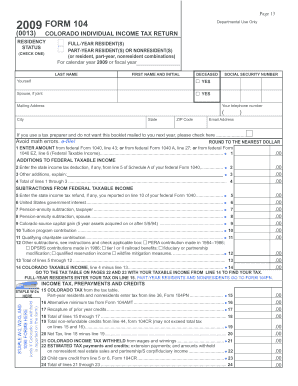
Get Colorado Tax Form 104 Printable
How it works
-

Open form follow the instructions
-

Easily sign the form with your finger
-

Send filled & signed form or save
How to fill out the Colorado Tax Form 104 Printable online
This guide will provide you with a clear, step-by-step approach to filling out the Colorado Tax Form 104 Printable online. Follow the instructions carefully to ensure accurate completion of your tax return.
Follow the steps to accurately complete your Colorado Tax Form 104 Printable online.
- Click ‘Get Form’ button to obtain the form and open it in the editor.
- Begin by indicating your residency status by checking the appropriate box for full-year resident, part-year resident, or nonresident. Provide your last name and first name, along with your Social Security number.
- Fill in your mailing address, telephone number, and email address. If you are using a tax preparer and prefer not to receive the booklet for the following year, check the designated box.
- Locate 'Federal Taxable Income' at line 1. Enter the amount from your federal Form 1040, line 43; or federal Form 1040A, line 27; or federal Form 1040EZ, line 6.
- Proceed to 'Additions to Federal Taxable Income.' Complete lines 2 through 4 by entering any state income tax deduction, other additions, and totaling them.
- Next, address 'Subtractions from Federal Taxable Income.' Complete lines 5 through 13, entering any relevant amounts and explaining where necessary.
- Calculate your 'Colorado Taxable Income' by entering the total from line 4 minus the total from line 13 on line 14.
- Consult the tax table to determine your tax amount based on the taxable income entered on line 14. Full-year residents should enter the tax amount on line 15.
- Enter the alternative minimum tax, if applicable, on line 16, and report any recaptures from prior year credits on line 17.
- Sum the amounts from lines 15 through 17 and enter the total on line 18. Then, complete the non-refundable credits on line 19 and deduct this from the total on line 20 to find your net tax.
- Document your Colorado income tax withheld on line 21, along with any estimated tax payments, and enter the total on line 24.
- Assess whether you have an overpayment by checking line 26. If applicable, indicate the amounts you wish to contribute to the various funds listed.
- Finalize your form by signing and dating it. Ensure both you and your spouse sign if filing jointly.
- Review all entries for accuracy, and then save your changes, download, print, or share the completed form as needed.
Complete your tax documents online to ensure accuracy and efficiency.
Does the Post Office Have Tax Forms? According to the USPS, post offices do not have tax forms available to customers. However, some other community locations, such as public libraries or government agencies, may have some tax forms you can pick up for free.