Loading
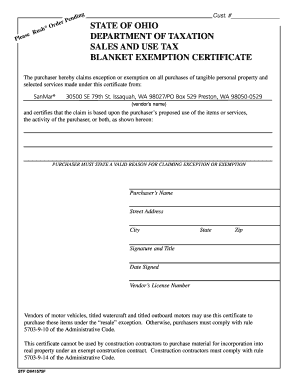
Get Tax Exempt Form Ohio
How it works
-

Open form follow the instructions
-

Easily sign the form with your finger
-

Send filled & signed form or save
How to fill out the Tax Exempt Form Ohio online
This guide provides comprehensive instructions for users on how to accurately complete the Tax Exempt Form Ohio online. Following these steps will ensure that your claims for exception or exemption are properly submitted and processed.
Follow the steps to complete the Tax Exempt Form Ohio.
- Click ‘Get Form’ button to obtain the form and open it in the editor.
- In the first section, enter the purchaser’s name. This should be the legal name of the individual or business claiming the exemption.
- Complete the address fields by providing the street address, city, state, and zip code of the purchaser. Ensure all information is accurate to avoid processing delays.
- In the section where the reason for claiming exception or exemption is requested, provide a valid explanation based on the intended use of the items or services. This is a required field and must be detailed.
- Sign the form where indicated. Include the title of the purchaser if applicable. This signature certifies that the information provided is correct.
- Enter the date when the form is signed. Accurate dates are vital to validate the claim.
- If applicable, include the vendor’s license number, which is necessary for processing purchases under the resale exception.
- Once all fields are filled out, you can save changes, download, print, or share the form as needed.
Start completing your Tax Exempt Form Ohio online to benefit from available exemptions.
To apply for tax-exempt status, you must complete IRS Form 1023, Application for Recognition of Exemption Under Section 501(c)(3) of the Internal Revenue Code.