Loading
Form preview
  • US Legal Forms
  • Form Library
  • More Forms
  • More Multi-State Forms
  • Luzerne County Community College Transcripts

Get Luzerne County Community College Transcripts

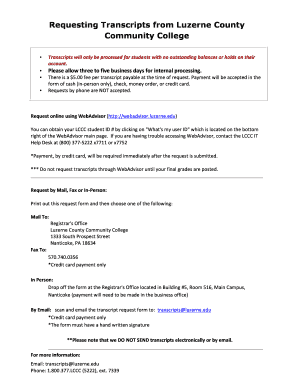
Requesting Transcripts from Luzerne County Community College Transcripts will only be processed for students with no outstanding balances or holds on their account. Please.

How it works

  1. Open form

    Open form follow the instructions

  2. Easily sign form

    Easily sign the form with your finger

  3. Share form

    Send filled & signed form or save

How to fill out the Luzerne County Community College transcripts online

This guide provides a clear and supportive approach to completing the Luzerne County Community College transcripts request online. It offers detailed, step-by-step instructions to help users navigate the process smoothly, ensuring that you can efficiently obtain your transcripts.

Follow the steps to complete the online transcripts request form.

  1. Press the ‘Get Form’ button to access the transcript request form and open it in your editor.
  2. Enter your student ID, which could be your Social Security number or LCCC ID, in the designated field.
  3. Fill in your full name as registered with the college, ensuring accuracy for proper identification.
  4. Provide your current address, including city, state, and zip code, for mailing purposes.
  5. Input your phone number so that the college can contact you if necessary regarding your request.
  6. Enter your birth date in the specified format to further verify your identity.
  7. Indicate if you are a current LCCC student by checking 'YES' or 'NO.'
  8. Specify the number of transcripts requested in the appropriate field.
  9. Check 'YES' or 'NO' to indicate if you require an official transcript, which is necessary for other institutions.
  10. Select your preference for when you want the transcripts sent: immediately, at the end of the semester, after your degree is recorded, or to take with you in person.
  11. Enter the institution or individual’s name and address where the transcripts should be sent, ensuring to provide complete information.
  12. Sign and date the form to authorize the release of your transcripts.
  13. Choose your payment method and provide the necessary information, including credit card details if applicable.
  14. Once you have completed the form, save your changes, and submit the request online, ensuring all required information is included.

Complete your transcript request online today for efficient processing and delivery.

Get form

Experience a faster way to fill out and sign forms on the web. Access the most extensive library of templates available.
Get form

Related content

ITT Technical Institute Student Information...
Mar 1, 2017 — TRANSCRIPTS. ITT is no longer providing transcripts to graduates and...
Learn more
Registrar's Office ... - Luzerne County Community...
Requesting Transcripts · Request online: Request your transcript online using Self...
Learn more
Pennsylvania State University - Wikipedia
The Pennsylvania State University (Penn State or PSU) is a public state-related land-grant...
Learn more

Related links form

Application For Refund Form.doc - Cmaustralia Org Life Substances Notes Survival Horror Character Sheet Cyprus Health And Social Sciences University

Questions & Answers

Get answers to your most pressing questions about US Legal Forms API.

Contact support

Call NOVA's Call Center at 703.323. 3000.

Ordering Transcripts from LCCC Students may now request transcripts in the following ways: Through the myLCCC portal. ... By ordering an electronic transcript on the National Student Clearinghouse website. ... Fill-out a Transcript Request Form to have a printed transcript sent on your behalf.

Contact Information OfficeEmailRegistrationEnrollment Verification, student ID, official recordsregistrar@mymail.lccc.eduBusiness OfficePayment, fines, residencybursar1@mymail.lccc.eduFinancial Aidfinaid@mymail.lccc.eduPublic Safety/SecurityParking stickers, safety concernspublicsafety@lccc.edu7 more rows

Office Staff: Contact us by phone at 570-740-0339 or by e-mail at registrar@luzerne.edu.

Sending Transcripts to LCCC Official high school and college transcripts can be submitted via secure electronic PDF (student-records@lccc.wy.edu), or by mail (LCCC, Attn: Office of the Registrar, 1400 E. College Drive, Cheyenne, WY 82007).

Request official transcripts 24/7 through the Self-Service app in your myLCCC account. If you no longer have access to myLCCC, you can request official transcripts online through the National Student Clearinghouse. You can place as many orders as you like in one session using any major credit card.

If you need help understanding your bill or have any other billing relating questions, please contact the Business Office at 610-799-1592 or email at bursar1@mymail.lccc.edu.

Unofficial transcripts can be found by logging into your myPPCC account. Select the "Student" tab. Go to the "My Student Stuff" box. Click on "Quick Links" Click on "Unofficial Transcripts"

Get This Form Now!

Use professional pre-built templates to fill in and sign documents online faster. Get access to thousands of forms.
Get form
If you believe that this page should be taken down, please follow our DMCA take down processhere.

Industry-leading security and compliance

US Legal Forms protects your data by complying with industry-specific security standards.
  • In businnes since 1997
    25+ years providing professional legal documents.
  • Accredited business
    Guarantees that a business meets BBB accreditation standards in the US and Canada.
  • Secured by Braintree
    Validated Level 1 PCI DSS compliant payment gateway that accepts most major credit and debit card brands from across the globe.
Get Luzerne County Community College Transcripts
Get form
  • Adoption
  • Bankruptcy
  • Contractors
  • Divorce
  • Home Sales
  • Employment
  • Identity Theft
  • Incorporation
  • Landlord Tenant
  • Living Trust
  • Name Change
  • Personal Planning
  • Small Business
  • Wills & Estates
  • Packages A-Z
  • Affidavits
  • Bankruptcy
  • Bill of Sale
  • Corporate - LLC
  • Divorce
  • Employment
  • Identity Theft
  • Internet Technology
  • Landlord Tenant
  • Living Wills
  • Name Change
  • Power of Attorney
  • Real Estate
  • Small Estates
  • Wills
  • All Forms
  • Forms A-Z
  • Form Library
  • Legal Hub
  • About Us
  • Help Portal
  • Legal Resources
  • Blog
  • Affiliates
  • Contact Us
  • Delete My Account
  • Site Map
  • Industries
  • Forms in Spanish
  • Localized Forms
  • State-specific Forms
  • Forms Kit
  • Real Estate Handbook
  • All Guides
  • Notarize
  • Incorporation services
  • For Consumers
  • For Small Business
  • For Attorneys
  • USLegal
  • FormsPass
  • pdfFiller
  • signNow
  • altaFlow
  • DocHub
  • Instapage
Form Packages
  • Adoption
  • Bankruptcy
  • Contractors
  • Divorce
  • Home Sales
  • Employment
  • Identity Theft
  • Incorporation
  • Landlord Tenant
  • Living Trust
  • Name Change
  • Personal Planning
  • Small Business
  • Wills & Estates
  • Packages A-Z
Form Categories
  • Affidavits
  • Bankruptcy
  • Bill of Sale
  • Corporate - LLC
  • Divorce
  • Employment
  • Identity Theft
  • Internet Technology
  • Landlord Tenant
  • Living Wills
  • Name Change
  • Power of Attorney
  • Real Estate
  • Small Estates
  • Wills
  • All Forms
  • Forms A-Z
  • Form Library
Customer Service
  • Legal Hub
  • About Us
  • Help Portal
  • Legal Resources
  • Blog
  • Affiliates
  • Contact Us
  • Delete My Account
  • Site Map
  • Industries
  • Forms in Spanish
  • Localized Forms
  • State-specific Forms
  • Forms Kit
Legal Guides
  • Real Estate Handbook
  • All Guides
Prepared for you
  • Notarize
  • Incorporation services
Our Customers
  • For Consumers
  • For Small Business
  • For Attorneys
Our Sites
  • USLegal
  • FormsPass
  • pdfFiller
  • signNow
  • altaFlow
  • DocHub
  • Instapage
Social Media
Call us now toll free:
+1 833 426 79 33
As seen in:
© Copyright 1999-2026 airSlate Legal Forms, Inc. 3720 Flowood Dr, Flowood, Mississippi 39232
  • Your Privacy Choices
  • Terms of Service
  • Privacy Notice
  • Content Takedown Policy
  • Bug Bounty Program