Loading
Get Legal & General Q40033 2018-2026
How it works
-

Open form follow the instructions
-

Easily sign the form with your finger
-

Send filled & signed form or save
How to fill out the Legal & General Q40033 online
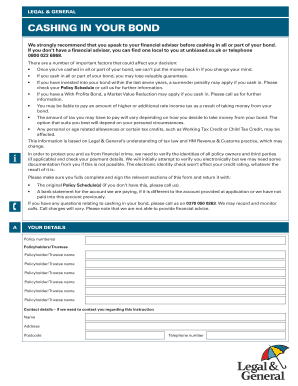
Filling out the Legal & General Q40033 form is a crucial step in cashing in your bond. This guide provides clear, step-by-step instructions to help you complete the process with ease and confidence.
Follow the steps to successfully complete your application.
- Press the ‘Get Form’ button to access the Legal & General Q40033 form and open it for editing.
- Begin by entering your details in section A. Provide your policy number(s), names of all policyholders or trustees, and contact information including your name, address, postcode, and telephone number.
- In section B, indicate your intention to cash in your bond. Choose either 'I want to cash in all of my bond' or 'I want to cash in part of my bond'. Follow the prompts based on your selection.
- If you selected to partially cash in your bond, proceed to section C and choose from the three options provided: fully cashing in whole policies, partially cashing in across all policies, or partially cashing in after fully cashing in certain policies. Be sure to specify either the total amount you wish to withdraw or the number of policies to cash in.
- Complete section D with your bank details, including the account holder's name, sort code, account number, and the name and address of your bank or building society.
- In section E, all policyholders must read the declaration carefully, then sign and date the form. Ensure that signatures are added as required for each policyholder or trustee.
- Lastly, review the entire form for accuracy and completeness. Save any changes you've made, and prepare to print or share the document as needed.
Ready to cash in your bond? Complete the Legal & General Q40033 form online today!