Loading
Get Molina Healthcare Mho-2452 2018-2026
How it works
-

Open form follow the instructions
-

Easily sign the form with your finger
-

Send filled & signed form or save
How to fill out the Molina Healthcare MHO-2452 online
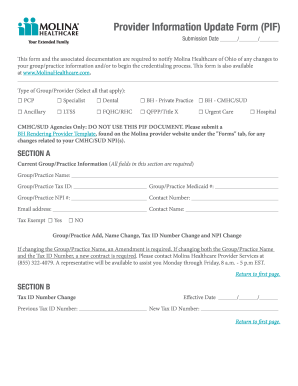
The Molina Healthcare MHO-2452 is an essential document for updating provider information. It is designed to help healthcare providers communicate changes, additions, and deletions regarding their practice or group to Molina Healthcare. This guide will walk you through the steps to effectively complete the form online.
Follow the steps to fill out the Molina Healthcare MHO-2452 form online.
- Press the ‘Get Form’ button to access the Molina Healthcare MHO-2452 form.
- Begin with Section A, where you will provide your current group or practice information. Ensure to fill out all required fields, including group/practice name, tax ID, Medicaid number, NPI number, contact number, email address, contact name, and tax exempt status.
- If applicable, move to Section B to update any changes to your tax ID number. Enter the previous tax ID number, effective date of the change, and the new tax ID number.
- Proceed to Section C if you are changing either a group or individual NPI. Indicate whether it is a group or individual change, and provide the previous and new NPI numbers.
- If you need to change the group/practice name, navigate to Section D. Complete the effective date, previous name, and the new group/practice name.
- For an individual name change, fill out Section E with the previous name, effective date, and the new name.
- In Section F, provide information for any changes to phone or fax numbers, including previous and new numbers as well as the address.
- If you are adding or changing a service location, fill out Section G for group changes or Section H for individual changes. Indicate if the location is closing, provide addresses, and contact details.
- In Section I, complete any changes regarding billing address. Include the previous and new billing information, contact, and indicate if this is a notice address change.
- When terminating a provider, provide necessary details in Section J, including the effective date, provider name, and reason for termination.
- If you need to update the provider directory or panel, complete Sections L and K respectively, specifying desired changes and reasons.
- For provider joining a group, fill out Section N with detailed information such as effective date, provider name, specialty, and NPI number.
- Finally, review Section O for office hours, fill in the required times for each day of the week, and ensure all provided information is accurate.
- After completing all required sections, save your changes, and you can download, print, or share the form as necessary to submit it to Molina Healthcare.
Start completing your Molina Healthcare MHO-2452 form online today for a smooth update process.
Molina Health PlansMedicaid Molina Healthcare contracts with state governments and serves as a health plan, providing a wide range of quality health care services to families and individuals who qualify for government-sponsored programs, including Medicaid and the State Children's Health Insurance Program (SCHIP).