Loading

Open form follow the instructions

Easily sign the form with your finger

Send filled & signed form or save
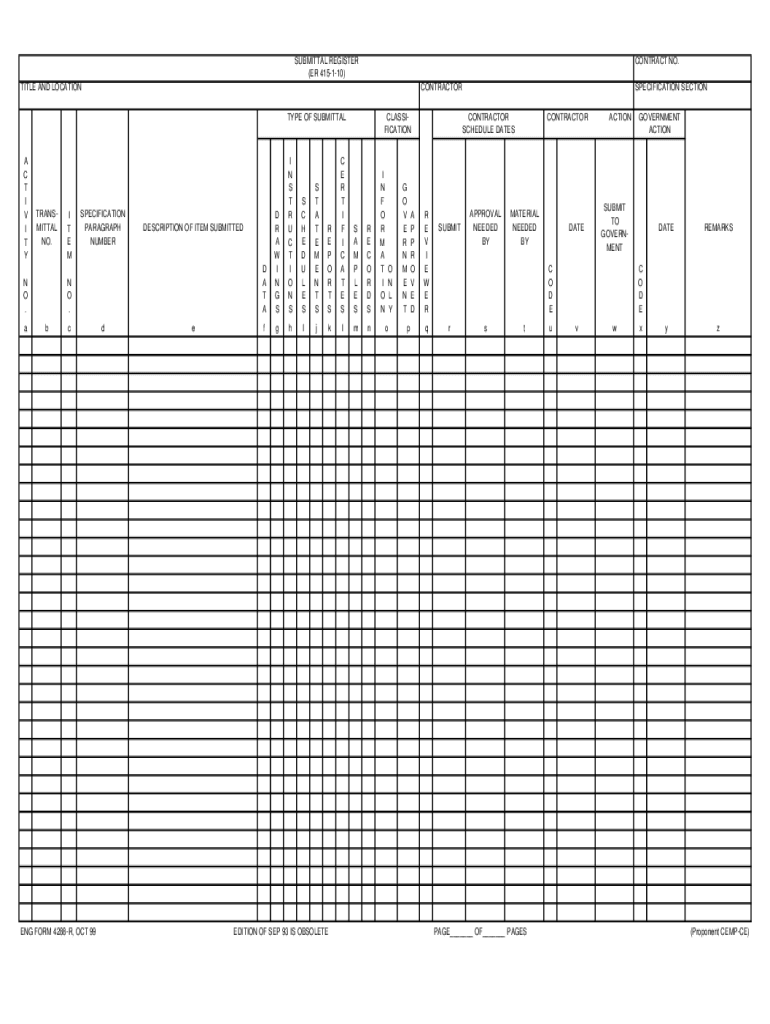
How to fill out the ENG 4288-R online
This guide provides a detailed walkthrough for filling out the ENG 4288-R form online. Whether you are a seasoned user or new to digital document management, these straightforward instructions will help you navigate each section with ease.
Follow the steps to complete your form accurately.
- Press the ‘Get Form’ button to access the ENG 4288-R online. This action will allow you to open the form in an editable format.
- Begin filling out the contract number field at the top of the form. This number identifies your specific contract and must be accurately entered.
- In the title and location section, provide the official title of the project along with its physical location to ensure proper identification.
- Next, enter the contractor's name in the designated field. This should reflect the legal name of the company or individual undertaking the contract.
- Select the type of submittal by marking the appropriate box. This section typically categorizes the submittal type for easy classification.
- Fill in the activity section, which may require specific details about the operations related to the contract.
- Input the transmittal number in the assigned field. This unique identifier helps in tracking the submission process.
- Provide item numbers, ensuring they correspond to your submission needs. Each item submitted should be listed clearly.
- Enter the specification paragraph number, as this indicates which section of the contract the submission pertains to.
- In the description of item submitted, give a detailed explanation of what you are submitting. Clarity here helps prevent misunderstandings.
- For any drawings, schedules, statements, or reports you are submitting, include these in their respective sections and provide details as required.
- Complete the necessary sections on classifications, samples, records, and additional information as prompted. Make sure to provide accurate information to avoid delays.
- Fill in the contractor schedule dates, noting key dates for review and approval needed for your submission.
- Ensure to indicate the government action dates and any remarks relevant to your submission in the specified fields.
- Finally, review all filled-in information for accuracy. Once everything is confirmed, you may save your changes, download, print, or share the completed form as necessary.
Complete your ENG 4288-R form online today for efficient document management.
Experience a faster way to fill out and sign forms on the web. Access the most extensive library of templates available.
Related content
as indicated on ENG FORM 4288-R. 4. Submittals requiring expeditious handling will be...
"Chain of Command". 2. Individual Responsibilities. B. Submittals. 1. Scheduling (ENG Form...
DXAI 4288-2 ... 3) Press the select/channel key to select Eng, Fr. or Esp. 4) Press the...
Get answers to your most pressing questions about US Legal Forms API.
Who is responsible to review all submittals before submitting to the government?
QC personnel and designer of record are responsible for ensuring, through detailed review, that all submittals are in full compliance with the contract. The contractor must review the Government prepared Submittal Register and add any needed additional submittals.
What is the ENG Form 4288 R?
Submittal Register (ENG 4288-R) – Army Corps of Engineers Government Form in U.S. – Formalu.
Use professional pre-built templates to fill in and sign documents online faster. Get access to thousands of forms.
If you believe that this page should be taken down, please follow our DMCA take down process here.