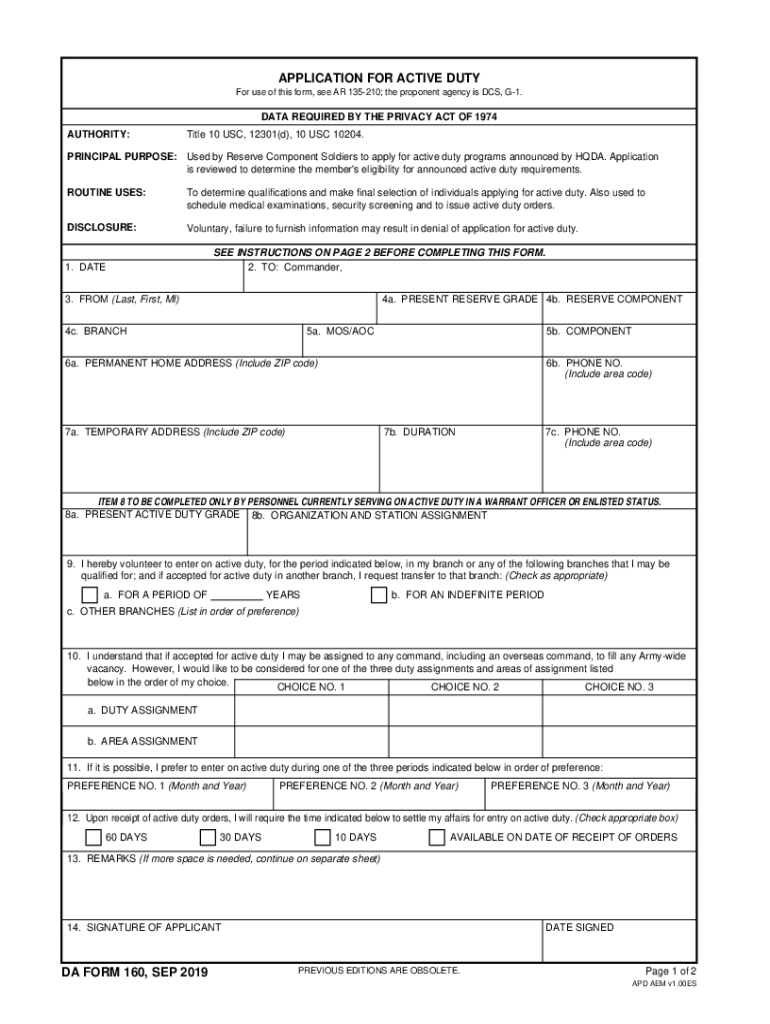
APPLICATION FOR ACTIVE DUTY For use of this form, see AR 135210; the proponent agency is DCS, G1.DATA REQUIRED BY THE PRIVACY ACT OF 1974 AUTHORITY:Title 10 USC, 12301(d), 10 USC 10204.PRINCIPAL PURPOSE:.

Open form follow the instructions

Easily sign the form with your finger

Send filled & signed form or save
How to fill out the DA 160-R online
The DA 160-R is an essential form used by Reserve Component Soldiers seeking to apply for active duty programs. This guide provides a clear and structured approach to help users efficiently complete the form online, ensuring all necessary information is gathered and submitted accurately.
Follow the steps to effectively complete your application
- Click the 'Get Form' button to obtain the DA 160-R and open it in your preferred online editor.
- Begin filling out your personal information: in item 1, enter the date of application, and in item 3, input your last name, first name, and middle initial.
- For item 2, insert the appropriate area command to which you belong; if you are active duty in a warrant officer or enlisted status, use your current command.
- In item 4, complete sub-items 4a (present reserve grade), 4b (reserve component), and 4c (branch of service) with accurate details.
- Proceed to item 5 to provide your military occupational specialty (MOS) or area of concentration (AOC) in sub-item 5a and the reserve component you are applying for in sub-item 5b.
- Fill in item 6 with your permanent home address (6a) and a contact phone number (6b) formatted with the area code.
- If applicable, enter your temporary address and duration of stay under item 7, along with a temporary phone number.
- Complete item 8 only if currently serving on active duty. Provide your present active duty grade and organization assignment.
- In item 9, specify your voluntary choice for active duty duration and any other branches of service you'd consider.
- Outline your preferred duty assignments in item 10, detailing three choices for duty and area assignments in order of preference.
- Indicate your preferred entry date for active duty in item 11.
- Indicate the time needed to settle your affairs using item 12.
- If further explanation is needed, use item 13 for additional remarks.
- Review the entire application carefully to ensure accuracy and completeness before proceeding with submission.
- Sign and date the form in item 14 before saving changes, and download or print the completed application for submission.
Complete your documents online for a streamlined application process.
Experience a faster way to fill out and sign forms on the web. Access the most extensive library of templates available.
Related content
Form DS-160 is submitted electronically to the Department of State website via the...
Oct 22, 2015 - DA Form 160-R (Application For Active Duty):. ❖ Block 1 - Date! Page 3...
174–160 BC) and Emperor Wen (r. 180–157 BC) to reopen border markets, many of the...
Use professional pre-built templates to fill in and sign documents online faster. Get access to thousands of forms.
If you believe that this page should be taken down, please follow our DMCA take down process here.