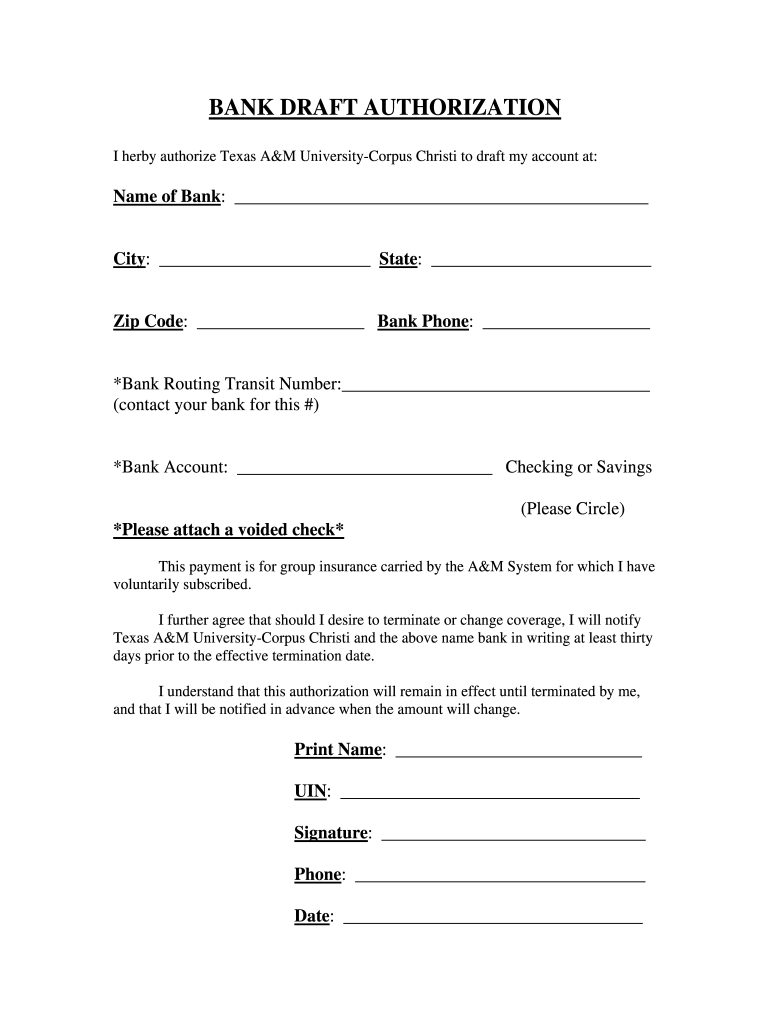
State: Zip Code: Bank Phone: *Bank Routing Transit Number: (contact your bank for this #) *Bank Account: Checking or Savings (Please Circle) *Please attach a voided check* This payment is for group insurance carried by the A&M System for which I have voluntarily subscribed. I further agree that should I desire to terminate or change coverage, I will notify Texas.

Open form follow the instructions

Easily sign the form with your finger

Send filled & signed form or save
How to fill out the Authorization Form online
Filling out the Authorization Form online is a straightforward process that requires attention to detail. This guide will walk you through each section of the form to ensure that your submission is accurate and complete.
Follow the steps to fill out the Authorization Form effectively
- Press the ‘Get Form’ button to obtain the Authorization Form and open it in your document editor.
- In the designated space, enter the name of your bank. Ensure that the spelling is correct for accurate processing.
- Fill in the city, state, and zip code of your bank. Double-check these details to avoid any errors in banking transactions.
- Provide your bank's phone number. This is important for Texas A&M University-Corpus Christi to verify your banking details.
- Locate your bank routing transit number and write it in the specified field. Contact your bank if you are unable to find this information.
- Enter your bank account number in the designated space and indicate whether it is a checking or savings account by circling the appropriate option.
- Attach a voided check to the completed form as instructed. This helps confirm your account details.
- Read the section regarding your payment obligations for group insurance and ensure you understand it fully.
- In the printed name field, provide your full name as the account holder.
- Input your University Identification Number (UIN) for identification purposes.
- Sign the document in the signature section to validate your authorization.
- Fill in your phone number to ensure that you can be reached for any follow-up queries.
- Finally, enter the date of completion to timestamp your authorization.
- Once all fields are completed, you can save your changes, download a copy, print the form, or share it as necessary.
Complete your Authorization Form online today to ensure smooth processing of your requests.
Experience a faster way to fill out and sign forms on the web. Access the most extensive library of templates available.
Related content
Tax Information Authorization. Department of the ... Don't use Form 8821 to request copies...
Apr 13, 2021 — Use Form I-9 to verify the identity and employment authorization of...
The Wyoming Medical Power of Attorney Form is a legal instrument intended to ... the...
Get answers to your most pressing questions about US Legal Forms API.
How do I write an authorization letter?
On the top left-hand corner of the page put down the name, address, and date. ... Below the name of the letter writer, it is important to include the name of the recipient and the relevant address. The letter then will open with Dear, Mr/Ms.
What is signed authorization form?
A signature authorization letter is a formal letter that allows a person to appoint someone else to be the signature authority for any required work on his/her behalf when unavailable.
What is an authorization form used for?
An authorization is a detailed document that gives covered entities permission to use protected health information for specified purposes, which are generally other than treatment, payment, or health care operations, or to disclose protected health information to a third party specified by the individual.
How do you write an authorization letter for someone to act on your behalf?
(Your Name) ... (Date) (Recipient Name) ... (RE: Subject)(Dear Recipient Name: ) I, (Your Name), hereby give (Appointed Representative) permission to act on my behalf with regards to making any and all real estate decisions.
What is the difference between Form 2848 and 8821?
IRS Form 8821, Tax Information Authorization, allows you certain access to your client's information. In that way, it is similar to a power of attorney but grants less authority. The biggest difference between Form 2848 and Form 8821 is that the latter does not allow you to represent your client to the IRS.
What is authorization statement?
The authorization statement is located at the bottom of every job application, just above the signature field. It is a fully customizable field, that allows your organization to add any legal terms to which the applicant is agreeing by submitting the job application.
What is Form 8821 Tax Information Authorization?
Form 8821 authorizes the IRS to disclose your confidential tax information to the person you appoint. This form is provided for your convenience and its use is voluntary. The information is used by the IRS to determine what confidential tax information your appointee can inspect and/or receive.
What is a signature authorization form?
A signature authorization letter is a formal letter that allows a person to appoint someone else to be the signature authority for any required work on his/her behalf when unavailable.
How do you write a letter giving someone permission?
State your purpose. Begin with a direct statement clearly stating the letter's purpose. Include the full names of yourself, your child, and the person you are granting permission to. If the child has another custodian or parent, write the letter together if possible.
What is a 8821 form used for?
More In Forms and Instructions File Form 8821 to: Authorize any individual, corporation, firm, organization, or partnership you designate to inspect and/or receive your confidential information verbally or in writing for the type of tax and the years or periods listed on the form.
Use professional pre-built templates to fill in and sign documents online faster. Get access to thousands of forms.
If you believe that this page should be taken down, please follow our DMCA take down process here.