Loading
Get Punjab Food Authority Okara
How it works
-

Open form follow the instructions
-

Easily sign the form with your finger
-

Send filled & signed form or save
How to fill out the Punjab Food Authority Okara online
Filling out the Punjab Food Authority Okara application form online can be a straightforward process if you follow these clear instructions. This guide will provide step-by-step details to ensure that users with varying degrees of experience can complete the application accurately.
Follow the steps to successfully complete your application form.
- Click ‘Get Form’ button to obtain the application form and open it in the editor.
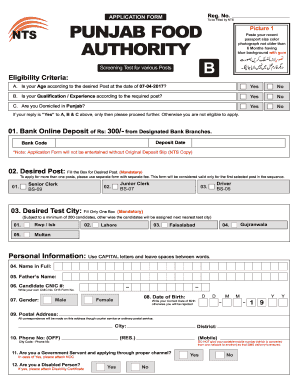
- Paste a recent passport size color photograph, not older than six months, with a blue background in the designated area of the form.
- In the eligibility criteria section, answer the questions related to age, qualification, and domicile status with 'Yes' or 'No'. Only proceed if you answered 'Yes' to all three questions.
- Complete the bank deposit section by noting the online deposit of Rs 300 and filling in the deposit date and bank code. Remember, the application will not be accepted without the original deposit slip.
- Indicate your desired post by filling in the corresponding box. If you are applying for multiple posts, ensure to use a separate form for each.
- Select your preferred test city by filling in only one box. Note that if there are not enough candidates for the city you choose, you may be assigned to the nearest available test city.
- Complete the personal information section using capital letters, filling in your full name, father’s name, CNIC number, gender, date of birth, and postal address.
- Provide your phone number, ensuring to avoid using temporary or portable numbers to guarantee SMS delivery.
- If applicable, indicate whether you are a government servant or a person with a disability, providing necessary documentation as required.
- Fill in the academic information section accurately, ensuring to convert grades into marks and specifying the degree names and major subjects.
- Detail your employment record, mentioning the organization, job title, duration, and relevant details without attaching certificates at this stage.
- Review the general instructions carefully and ensure that no fields are left blank. Provide the required attachments, including photographs, CNIC copies, and the original bank deposit slip.
- Once all information is complete and reviewed, save your changes, download or print the form for submission, or share it if needed.
Complete your application online today to ensure your submission is timely and accurate.
Paying your taxes/fees via ePay Punjab allows you to go cashless and paperless with convenience. Download the App (ePay Punjab App) To avail convenient tax payment services of ePay, download the App from Apple App Store or the Google Play Store. Select a Service (Levy) (Facility) ... Generate PSID for payment. ... Make a Payment.