Loading
Form preview
  • US Legal Forms
  • Form Library
  • More Forms
  • More Multi-State Forms
  • Direct Deposit Authorization - E*trade

Get Direct Deposit Authorization - E*trade

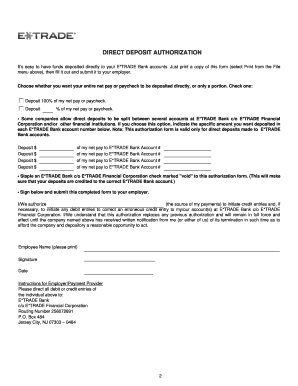
DIRECT DEPOSIT AUTHORIZATION COMPLETE YOUR E*TRADE APPLICATION IN THREE EASY STEPS The Direct Deposit Authorization you requested begins on the following page. To complete your application, simply:.

How it works

  1. Open form

    Open form follow the instructions

  2. Easily sign form

    Easily sign the form with your finger

  3. Share form

    Send filled & signed form or save

How to fill out the DIRECT DEPOSIT AUTHORIZATION - E*Trade online

Completing the Direct Deposit Authorization form for E*Trade is a straightforward process that enables users to deposit funds directly into their bank accounts. This guide will walk you through each section of the form to ensure a seamless experience.

Follow the steps to successfully complete the form.

  1. Press the ‘Get Form’ button to obtain the form and open it in the online editor.
  2. Scroll down the form and fill out each required field by typing in the appropriate information. If you prefer to complete the application by hand, you may skip this step.
  3. After entering the requested information, review your application to ensure it is complete. Confirm that all sections have been filled out accurately.
  4. Once satisfied, print the application by selecting the print option from the tool options available on the top toolbar.
  5. Sign and date the application at the designated areas to validate your request.
  6. Mail the completed form to your employer using the appropriate address provided for either overnight or regular mail.
  7. For added accuracy, attach a voided check from your E*Trade Bank account to ensure correct deposit routing.

Complete your DIRECT DEPOSIT AUTHORIZATION form online today to streamline your payment process.

Get form

Experience a faster way to fill out and sign forms on the web. Access the most extensive library of templates available.
Get form

Related content

Direct Deposit (Electronic Funds Transfer)...
Apr 14, 2020 — Direct deposit (EFT) impacts every federal government vendor ... The ACH...
Learn more
Authorization for Electronic Direct Deposit...
E-mail Address (for notification of direct deposit). Financial Institution ... authorize...
Learn more
E*TRADE Developer Platform - UserManual.wiki
Dec 17, 2012 — The E*TRADE REST API uses the OAuth protocol to authorize every...
Learn more

Related links form

Fonda Training Internship Daily Log Book Example (To Be Typed On Letter Head And Send It To Us Duly Signed) Acknowledgement Letter, Receipt Of Payment Of Imposed Civil ... - Pbadupws Nrc

Questions & Answers

Get answers to your most pressing questions about US Legal Forms API.

Contact support

Complete and print out our E*TRADE Securities Wire Transfer Form. Send the completed form to your other financial institution and ask them to wire funds to E*TRADE Securities.

Write your eight-digit account number on the memo line. Sign the back of the check and write "for deposit only to [account number]" next to or directly under your signature. Attach a deposit slip (if you have one)

Funds availability will depend on the method of transfer: Transfer money electronically: Up to 3 business days. By check: Up to 5 business days. By wire transfer: Same business day if received before 6 p.m. ET.

At most, the bank account verification can take up to five business days, but usually it's much faster!

2) Sign into your online banking. In the Accounts Menu select External Accounts. 3) Click Complete Verification. 4) Enter the two test amounts then click Verify Account.

Log in to your E*Trade account. In the main menu, under Accounts click Complete View . The last 4 digits of your account number is available next to the account name on the following screen. Click Show Number to reveal the full 8-digit account number.

Brokerage Firm: eTrade.com. DTC Number: 0385.

Note: The external account should be an account that is owned by the business you represent. Once the deposits appear in your external account, log on to your Chase Commercial Online profile. Click Transfer Funds and select External. Click Verify Account.

If you want to be more active, go to the E-Trade site and locate the "Account Closure Request" link. Follow a two-step process that includes making sure you want to delete your account. Resolve all pending transactions and verify closing your account. You can also delete your account by phone by calling 1-800-ETRADE-1.

The ACH routing number will have to be included for sending an ACH transfer to any E-Trade Bank account. To send a domestic ACH transfer, you'll need to use the ACH routing number 256072691. You'll need to include the ACH routing number when sending an ACH transfer to any E-Trade account.

Get This Form Now!

Use professional pre-built templates to fill in and sign documents online faster. Get access to thousands of forms.
Get form
If you believe that this page should be taken down, please follow our DMCA take down processhere.

Industry-leading security and compliance

US Legal Forms protects your data by complying with industry-specific security standards.
  • In businnes since 1997
    25+ years providing professional legal documents.
  • Accredited business
    Guarantees that a business meets BBB accreditation standards in the US and Canada.
  • Secured by Braintree
    Validated Level 1 PCI DSS compliant payment gateway that accepts most major credit and debit card brands from across the globe.
Get DIRECT DEPOSIT AUTHORIZATION - E*Trade
Get form
  • Adoption
  • Bankruptcy
  • Contractors
  • Divorce
  • Home Sales
  • Employment
  • Identity Theft
  • Incorporation
  • Landlord Tenant
  • Living Trust
  • Name Change
  • Personal Planning
  • Small Business
  • Wills & Estates
  • Packages A-Z
  • Affidavits
  • Bankruptcy
  • Bill of Sale
  • Corporate - LLC
  • Divorce
  • Employment
  • Identity Theft
  • Internet Technology
  • Landlord Tenant
  • Living Wills
  • Name Change
  • Power of Attorney
  • Real Estate
  • Small Estates
  • Wills
  • All Forms
  • Forms A-Z
  • Form Library
  • Legal Hub
  • About Us
  • Help Portal
  • Legal Resources
  • Blog
  • Affiliates
  • Contact Us
  • Delete My Account
  • Site Map
  • Industries
  • Forms in Spanish
  • Localized Forms
  • State-specific Forms
  • Forms Kit
  • Real Estate Handbook
  • All Guides
  • Notarize
  • Incorporation services
  • For Consumers
  • For Small Business
  • For Attorneys
  • USLegal
  • FormsPass
  • pdfFiller
  • signNow
  • altaFlow
  • DocHub
  • Instapage
Form Packages
  • Adoption
  • Bankruptcy
  • Contractors
  • Divorce
  • Home Sales
  • Employment
  • Identity Theft
  • Incorporation
  • Landlord Tenant
  • Living Trust
  • Name Change
  • Personal Planning
  • Small Business
  • Wills & Estates
  • Packages A-Z
Form Categories
  • Affidavits
  • Bankruptcy
  • Bill of Sale
  • Corporate - LLC
  • Divorce
  • Employment
  • Identity Theft
  • Internet Technology
  • Landlord Tenant
  • Living Wills
  • Name Change
  • Power of Attorney
  • Real Estate
  • Small Estates
  • Wills
  • All Forms
  • Forms A-Z
  • Form Library
Customer Service
  • Legal Hub
  • About Us
  • Help Portal
  • Legal Resources
  • Blog
  • Affiliates
  • Contact Us
  • Delete My Account
  • Site Map
  • Industries
  • Forms in Spanish
  • Localized Forms
  • State-specific Forms
  • Forms Kit
Legal Guides
  • Real Estate Handbook
  • All Guides
Prepared for you
  • Notarize
  • Incorporation services
Our Customers
  • For Consumers
  • For Small Business
  • For Attorneys
Our Sites
  • USLegal
  • FormsPass
  • pdfFiller
  • signNow
  • altaFlow
  • DocHub
  • Instapage
Social Media
Call us now toll free:
+1 833 426 79 33
As seen in:
© Copyright 1999-2026 airSlate Legal Forms, Inc. 3720 Flowood Dr, Flowood, Mississippi 39232
  • Your Privacy Choices
  • Terms of Service
  • Privacy Notice
  • Content Takedown Policy
  • Bug Bounty Program