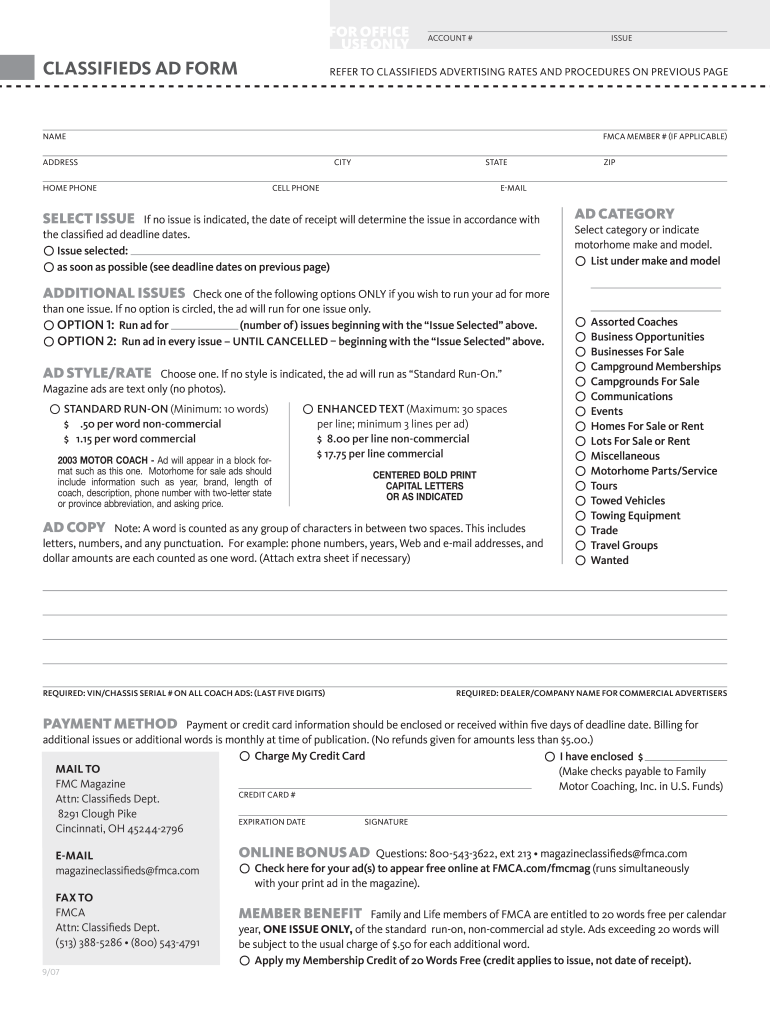
Motor Coaching, Inc. in U.S. Funds) Credit card # Attn: Classifieds Dept. 8291 Clough Pike Expiration Date Signature Cincinnati, OH 45244-2796 E-MAil magazineclassifieds fmca.com FAX TO FMCA Attn: Classifieds Dept. (513) 388-5286 (800) 543-4791 9/07 Online Bonus Ad Questions: 800-543-3622, ext 213 magazineclassifieds fmca.com Check here for your ad(s) to appear free online at FMCA.com/fmcmag (runs simultaneously with your print ad in the magazine). MEMBER BENEF.

Open form follow the instructions

Easily sign the form with your finger

Send filled & signed form or save
How to fill out the Fmca Classifieds online
Filling out the Fmca Classifieds form online can be a straightforward process when you follow the right steps. This guide will walk you through each section of the form, ensuring you provide all necessary information accurately and efficiently.
Follow the steps to complete the Fmca Classifieds form with ease.
- Click the ‘Get Form’ button to access the Fmca Classifieds form and open it in your preferred digital format.
- Fill in your account number and issue. Make sure to reference the advertising rates and procedures as needed, which are provided in the previous section of the document.
- Enter your personal information in the designated fields: Name, Fmca Member Number (if applicable), Address, City, State, Home Phone, Cell Phone, and Email.
- Select the issue for your ad. If you do not specify, the date of receipt will determine which issue it is published in according to the classified ad deadlines.
- If you wish for your ad to run in multiple issues, check the appropriate option. You can choose to specify the number of issues or run your ad in every issue until you cancel.
- Choose the ad style and rate that applies to you. Remember that if no style is indicated, your ad will run as 'Standard Run-On.' Carefully consider any commercial rates, as they may differ.
- In the ‘Ad Copy’ section, provide the text for your ad. Keep in mind that each word is counted, including phone numbers and punctuation. Ensure you adhere to any length restrictions and attach additional sheets if necessary.
- Select the appropriate ad category for your listing. This helps classify your ad for easier navigation by users.
- If you are a commercial advertiser, include your dealer or company name in the designated field.
- Indicate your payment method. Determine whether you will charge your credit card or if you will enclose payment. Ensure that you provide the necessary credit card details and a signature.
- Before submitting, check the option for your ad to appear free online at FMCA.com/fmcmag, if applicable.
- Finally, review all entries for accuracy. Once satisfied, you can save your changes, download a copy of the completed form, print it, or share it as needed.
Start completing your Fmca Classifieds form online today to ensure your ad reaches a wider audience!
Experience a faster way to fill out and sign forms on the web. Access the most extensive library of templates available.
Related content
Jul 24, 2020 — located at http://classifieds.chicagotribune.com/classifieds?category=...
... B: 'Styles Continued. Section C: Sports. Section C: Classifieds ... Classifieds Tracey...
The Forward Markets Commission (FMC) was the chief regulator of commodity futures markets...
Get answers to your most pressing questions about US Legal Forms API.
Does FMCA work in Canada?
You do NOT have to live in the U.S. to join FMCA. While most of the benefits and discounts apply to all members, there are some limitations: Tire Savings Program — Due to the currency exchange, the tire manufacturers (Michelin or Continental) do not honor the discount programs at Canadian tire dealers.
Who owns FMCA?
FMCA is owned by its membership, governed by elected officers and has a national office that conducts its business affairs.
What does FMCA membership include?
Members gain exclusive access to RV discount club savings, RV lifestyle resources, a monthly RV living magazine, RV rallies & more. Join our family! Get - and stay - connected with like-minded RVers on our Facebook page, FMCA Forums, and at International Conventions and other Events.
Is it worth it to join the FMCA?
There are also numerous benefits, from a mail forwarding service to roadside assistance to discounts that come with an FMCA membership. An additional purpose of FMCA is to protect RVers and help owners understand their legal rights.
How many members does FMCA have?
Since 1963, FMCA has issued more than 500,000 memberships to families who look to the association as their source of information about all facets of RV ownership and travel.
Use professional pre-built templates to fill in and sign documents online faster. Get access to thousands of forms.
If you believe that this page should be taken down, please follow our DMCA take down process here.