Loading
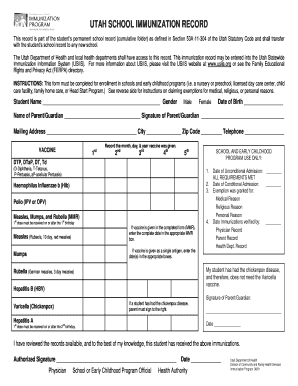
Get Ut Doh School Immunization Record 2001
How it works
-

Open form follow the instructions
-

Easily sign the form with your finger
-

Send filled & signed form or save
How to fill out the UT DoH School Immunization Record online
The UT DoH School Immunization Record is a crucial document that ensures students are immunized appropriately for school and early childhood programs. Completing this form accurately and thoroughly is essential for enrollment.
Follow the steps to successfully complete the immunization record.
- Press the ‘Get Form’ button to obtain the UT DoH School Immunization Record and open it for editing.
- Enter the student's name, gender, and date of birth in the designated fields. Ensure the information is printed or typed clearly.
- Fill in the name of the parent or guardian, along with their mailing address, city, zip code, and telephone number. The parent or guardian must provide their signature confirming the accuracy of the information.
- Document the month, day, and year when each vaccine was administered in the correct boxes for each immunization.
- Complete the 'SCHOOL AND EARLY CHILDHOOD PROGRAM USE ONLY' section by checking whether admission requirements have been met and providing the appropriate dates.
- Fill in the date immunization records were verified and indicate the source of verification (physician, parent, or health department records).
- Sign and date the form as the parent or guardian, and ensure any necessary exemption procedures are followed if applicable.
- Review the completed form for accuracy, then save changes, download, print, or share the document as needed.
Complete your documents online for a smooth enrollment process.
Get form
Experience a faster way to fill out and sign forms on the web. Access the most extensive library of templates available.
Related links form
Get This Form Now!
Use professional pre-built templates to fill in and sign documents online faster. Get access to thousands of forms.