Fedor.docx. msdos.doc. msdos.dat. radost.doc. rodos.docx. ??????????, ??????? ?? ????? ?? ??? ????? ???????? ????????? ?????? ??????: fedor.docx..... ? ??? ????? * ????? ???????? ? ?????? ??????????????????.??????????,.
Loading

Open form follow the instructions

Easily sign the form with your finger

Send filled & signed form or save
How to fill out the NY DOS-0999-f online
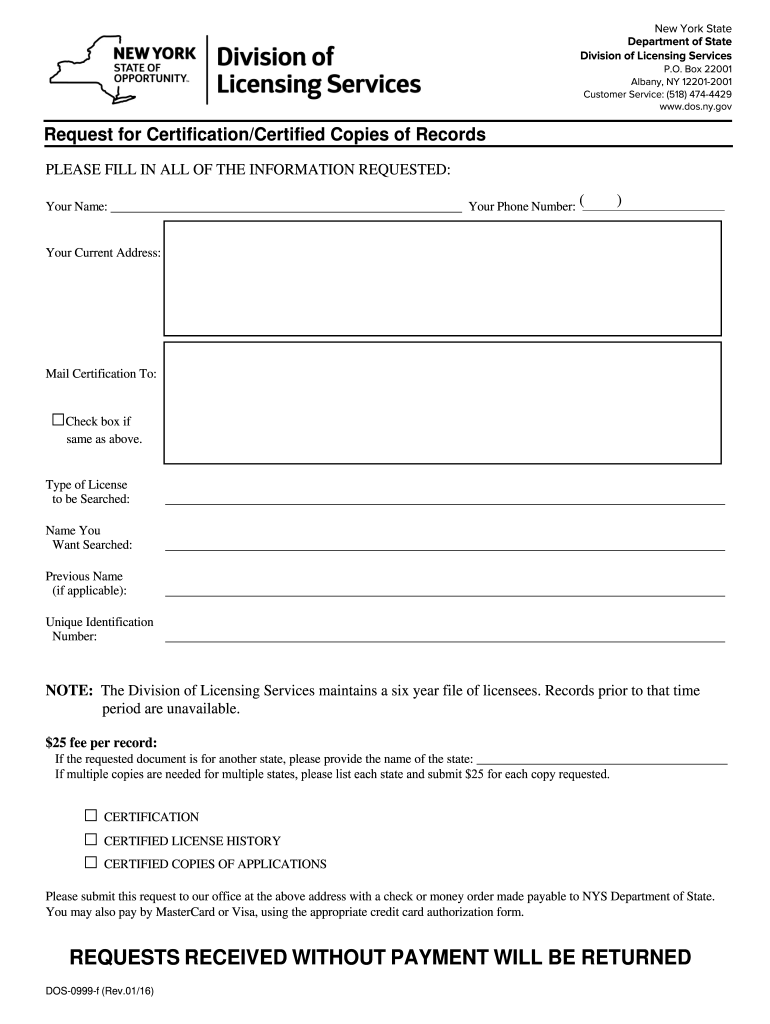
Filling out the NY DOS-0999-f form online is a straightforward process that allows users to request certification or certified copies of records from the New York State Department of State. This guide will provide you with clear, step-by-step instructions to help you complete the form accurately and efficiently.
Follow the steps to fill out the NY DOS-0999-f form online
- Click the ‘Get Form’ button to obtain the form and open it in your preferred online editor.
- Enter your name in the designated field. It is important to provide your full legal name for accurate identification.
- Fill in your phone number, ensuring it includes the area code for effective communication.
- Provide your current address in the specified section. This will be used for correspondence regarding your request.
- Indicate where you would like the certification to be mailed. If this is the same as your current address, check the box provided.
- Select the type of license you wish to be searched by marking the appropriate box.
- Input the name you would like searched in the relevant field. Ensure it is spelled correctly to avoid any errors.
- If applicable, provide any previous names under which the person may have held a license.
- Enter the unique identification number associated with the license, if known. This helps streamline the search process.
- Review the note regarding the six-year file availability to understand the limitation on records older than this period.
- Determine the type of certification you require by selecting the appropriate box: Certification, Certified License History, or Certified Copies of Applications.
- If your request is for another state, specify the name of that state in the designated area. If multiple copies are needed for different states, list each one and submit the corresponding fees.
- Prepare a payment method. You can include a check or money order made out to NYS Department of State, or you may opt to pay by credit card using the required form.
- Check through all entered information for accuracy before finalizing your request.
- Once satisfied, save your changes, download, print, or share the completed form as needed. Ensure to follow any submission guidelines provided in the form.
Ready to complete your request? Start filling out the NY DOS-0999-f form online today.
Experience a faster way to fill out and sign forms on the web. Access the most extensive library of templates available.
Related content
You may also pay by MasterCard or Visa, using the appropriate credit card authorization...
The Montana University System Transfer of Credit Policy as promulgated by the Commissioner...
Has successfully completed a full time course of graduate or postgraduate specialty...
Get answers to your most pressing questions about US Legal Forms API.
What is the fastest way to get a birth certificate in New York state?
The fastest way to obtain a birth certificate in New York State is by using the online request system. By completing the NY DOS-0999-f form online, you minimize delays associated with mail requests. For those needing urgent delivery options, check for expedited services through the official website or third-party services like uslegalforms.
Can I get my birth certificate online in NY?
Yes, you can get your birth certificate online in NY using the NY DOS-0999-f form. The online process allows you to request your certificate efficiently without leaving your home. Just ensure you provide accurate information and follow the instructions on the official site for a smooth experience.
How do I find my DOS ID number NY?
Finding your DOS ID number in New York is straightforward. You can locate it on official documents related to your business or organization. If you need further assistance, consider using online resources like uslegalforms to help you navigate through your records and retrieve your DOS ID number with ease.
How to get NY birth certificate online?
To obtain your NY birth certificate online, start by visiting the official NY state website. You can complete the request form for the NY DOS-0999-f directly on the site. Once you fill in the necessary information, submit your payment, and wait for your certificate to arrive by mail. This process is convenient and saves you time.
What is the DOS number for NYS?
The DOS number for New York State identifies your business or professional license registered with the Department of State. This unique identifier is essential for various legal and business transactions. If you need to reference documents pertaining to this number, you may come across NY DOS-0999-f, which provides further context on its use and application.
How to get a copy of a nursing license in NY?
To obtain a copy of your nursing license in New York, visit the New York State Department of Education website. They provide guidelines on how to request duplicates or certified copies of your license. If your request involves documentation such as NY DOS-0999-f, ensure you follow all necessary procedures to expedite your request.
What does DOS stand for in NY State?
In New York State, DOS stands for the Department of State. This governmental body is crucial for managing various administrative tasks, including licensing and business regulation. It encompasses various divisions that handle everything from licensing professionals to maintaining business records, including important documents such as NY DOS-0999-f.
Where do I find my NYS DOS number?
You can find your New York State DOS number by accessing your business registration documents or visiting the New York State Department of State website. They provide an online lookup tool that allows you to search by your business name or representative details. Your DOS number might also be referenced in documents like NY DOS-0999-f, so keep that in mind when searching for your number.
Is DOS ID the same as company registration number?
No, a Department of State (DOS) ID is not the same as a company registration number, though they serve related purposes. The DOS ID identifies your business entity in New York, while the registration number may refer to a specific registration for a professional license or certificate. If you are looking for documents associated with your DOS ID, consider NY DOS-0999-f for guidance on obtaining related information.
How do I check the status of my real estate license in NY?
To check the status of your real estate license in New York, you can visit the New York State Department of State's official website. Use the online search feature, where you can enter personal details to retrieve your license status. This process ensures you have access to the necessary information regarding your license, which may reference documents like NY DOS-0999-f for complete transparency.
Use professional pre-built templates to fill in and sign documents online faster. Get access to thousands of forms.
If you believe that this page should be taken down, please follow our DMCA take down process here.