Loading
Get Dol Eta 9061 2016-2026
How it works
-

Open form follow the instructions
-

Easily sign the form with your finger
-

Send filled & signed form or save
How to fill out the DoL ETA 9061 online
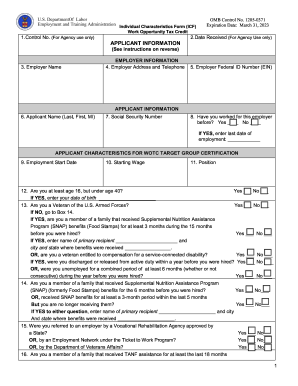
Filling out the DoL ETA 9061, known as the Individual Characteristics Form, is an essential step in determining eligibility for the Work Opportunity Tax Credit. This guide will provide clear instructions to help users navigate the form easily and ensure accurate completion.
Follow the steps to complete the DoL ETA 9061 online.
- Click ‘Get Form’ button to access the DoL ETA 9061 and open it in the editor.
- In the first section, labeled 'Employer Information', enter the employer's name, address including ZIP code, telephone number, and the Federal ID Number (EIN). Make sure all details are accurate as they are essential for WOTC certification.
- Proceed to the 'Applicant Information' section. Fill in the applicant's name (last, first, middle initial) and social security number exactly as they appear on the applicant’s social security card. Indicate if the applicant has worked for this employer before, and if so, provide the last date of employment.
- In the 'Applicant Characteristics' section, answer the questions regarding eligibility criteria for the WOTC program carefully. This includes questions about age, veteran status, and income details. Provide additional information where requested.
- Complete the 'Sources to Document Eligibility' box. List the documentation that supports the answers provided in the previous section. This could include letters from relevant agencies or other proof of eligibility.
- In the signature section, ensure the appropriate individual signs the form. This could be the applicant, an employer representative, or a guardian if the applicant is a minor. Date the form accordingly.
- Finally, save your changes, and options for downloading, printing, or sharing the completed form will be available. Make sure to keep a copy for your records.
Complete the DoL ETA 9061 online today to take the first step towards securing your Work Opportunity Tax Credit.