Loading
Get Nc Swu-264 2018-2026
How it works
-

Open form follow the instructions
-

Easily sign the form with your finger
-

Send filled & signed form or save
How to fill out the NC SWU-264 online
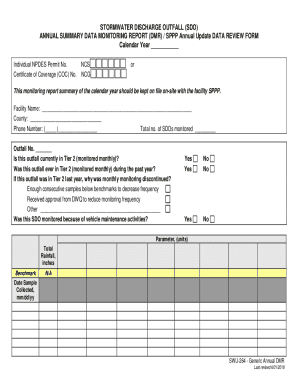
The NC SWU-264 form is an essential document for monitoring stormwater discharge outfalls. This guide provides a clear and supportive approach to filling out the form online, ensuring that users can complete it accurately and efficiently.
Follow the steps to successfully complete the NC SWU-264 form online.
- Click ‘Get Form’ button to access the NC SWU-264 and open it in your preferred editor.
- Begin by entering the calendar year in the designated field to indicate the reporting period for your stormwater discharge monitoring.
- Provide the individual NPDES permit number and the Certificate of Coverage (COC) number, ensuring accuracy for proper identification.
- Fill in the facility name and county, along with a contact phone number for reference during the monitoring period.
- Indicate the total number of stormwater discharge outfalls monitored by filling in the corresponding field.
- Specify the outfall number you are reporting on. Check the options to confirm if this outfall is currently or was ever in Tier 2 monitoring status.
- If monitoring frequency was reduced last year, indicate the reason such as having enough consecutive samples below benchmarks or receiving approval from the Division of Water Quality (DWQ).
- Answer whether this outfall was monitored due to vehicle maintenance activities by selecting ‘Yes’ or ‘No’ in the provided sections.
- Complete the parameters section by entering the measured data including rainfall amounts and the date samples were collected.
- Review the certification statement, ensuring that you understand the legal implications of your submission. Sign and date the document.
- Finally, you can save your changes, download, print, or share the completed form as needed.
Complete your NC SWU-264 online today for efficient stormwater management.