Loading
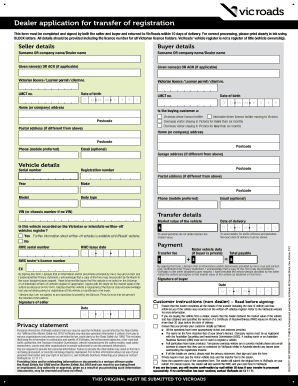
Get Au Vicroads Vrpin02687 2017
How it works
-

Open form follow the instructions
-

Easily sign the form with your finger
-

Send filled & signed form or save
How to fill out the AU VicRoads VRPIN02687 online
Completing the AU VicRoads VRPIN02687 form is a crucial step in transferring vehicle registration between buyers and sellers in Victoria. This guide will provide you with clear and concise instructions to successfully fill out the form online.
Follow the steps to fill out the form accurately.
- Click ‘Get Form’ button to obtain the form and open it in the editor.
- Begin with 'Seller details' section: Fill in the surname or company name of the seller, followed by their given names or ACN if applicable.
- Enter the Victorian licence or learner permit number and the date of birth for the seller. Ensure these details are correct to avoid processing delays.
- Complete the 'Buyer details' section: Include the surname or company name of the buyer, along with their given names or ACN, following the same structure as for the seller.
- Input the buyer's Victorian licence or learner permit number and date of birth. Verify all details against valid documents.
- Fill in the home (or company) address for both the seller and buyer. Provide postcodes and, if applicable, the postal address.
- In the 'Vehicle details' section, enter the serial number, registration number, year, make, body type, and VIN (or chassis number if no VIN is available).
- For the 'Transfer details,' state the market value of the vehicle and indicate whether the vehicle is recorded on the written-off vehicles register.
- Provide the required RWC serial number and issue date, as well as enter the date of delivery, ensuring accuracy to avoid penalties.
- Complete the payment details, including any applicable motor vehicle duty and transfer fee, calculating the total payable.
- Both the seller and buyer must sign the form, confirming that all provided information is true and correct. Ensure to date the signatures.
- Once all sections are completed accurately, users may save changes, download, print, or share the form.
Take the next step in your vehicle transfer by completing the AU VicRoads VRPIN02687 form online.
Get form
Experience a faster way to fill out and sign forms on the web. Access the most extensive library of templates available.
Get This Form Now!
Use professional pre-built templates to fill in and sign documents online faster. Get access to thousands of forms.