Loading
Get Aetna Gr-67938 S 2019-2026
How it works
-

Open form follow the instructions
-

Easily sign the form with your finger
-

Send filled & signed form or save
How to fill out the Aetna GR-67938 S online
This guide will walk you through the process of completing the Aetna GR-67938 S form online. Whether you are familiar with forms or new to this process, these clear instructions will assist you in providing the necessary information.
Follow the steps to complete the form accurately.
- Press the ‘Get Form’ button to acquire the form and open it in your editing tool.
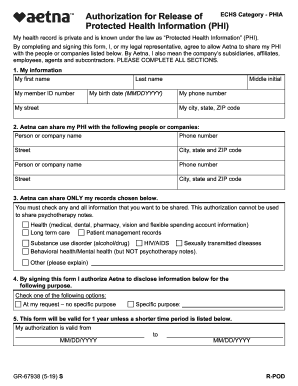
- In the 'My information' section, fill in your first name, last name, middle initial, member ID number, birth date (MMDDYYYY), street address, city, state, ZIP code, and phone number.
- In the 'Aetna can share my PHI with the following people or companies' section, list the names and contact information (phone number, street address, city, state, ZIP code) of the individuals or organizations you authorize.
- Under 'Aetna can share ONLY my records chosen below,' select the types of records you wish to share by checking the appropriate boxes, excluding psychotherapy notes.
- In the purpose section, indicate whether this authorization is 'At my request – no specific purpose' or specify the purpose for sharing your information.
- Set the validity date for this authorization, marking the start and end date in MM/DD/YYYY format.
- Review the section regarding your understanding and agreement. Ensure you acknowledge the consequences of sharing your PHI.
- Provide your signature or that of your legal representative, along with the date and printed name. If applicable, describe the relationship to the member.
- Final steps include saving your changes, downloading, printing, or sharing the completed form as needed.
Begin filling out the Aetna GR-67938 S online today to manage your health information effectively.