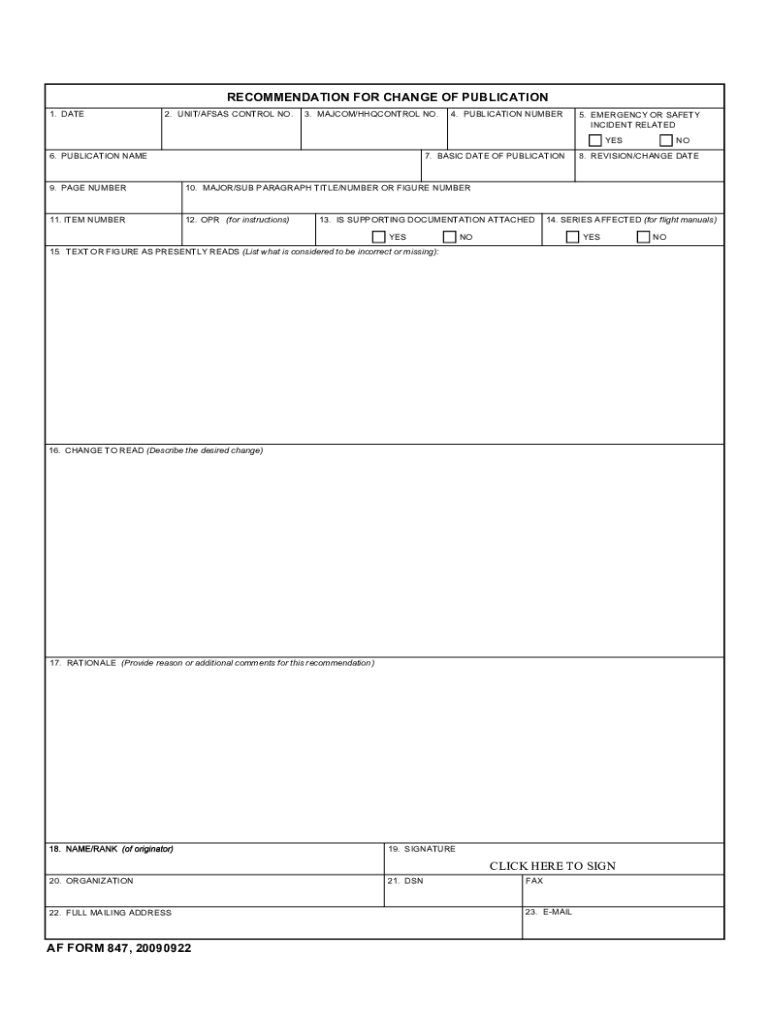
E-MAIL ADDRESS AF FORM 847 20010601 IMT-V1 5. EMERGENCY OR SAFETY INCIDENT PREVIOUS EDITION IS OBSOLETE. This is a web-optimized version of this form* Download the original full version www. usa-federal-forms. com/download*html Convert any form into fillable savable www. fillable. com Learn how to use fillable savable forms Demos www. fillable. com/demos. html Examples www. fillable. com/examples. html Browse/search 10 s of 1000 s of U*S* federal forms converted into fillable savable RECOMMENDATION FOR CHANGE OF PUBLICATION 1. DATE 2. UNIT CONTROL NUMBER 3. MAJCOM/HHQCONTROL NUMBER 6. PUBLICATION NAME 8. REVISION/CHANGE DATE 11. ITEM NUMBER 7. BASIC DATE OF PUBLICATION 9. PAGE NUMBER 12. OPR FOR INSTRUCTIONS 10. MAJOR/SUB PARAGRAPH TITLE/NUMBER or FIGURE NUMBER 13. IS SUPPORTING DOCUMENTATION ATTACHED YES NO 14. SERIES AFFECTED FOR FLIGHT MANUALS 15. TEXT OR FIGURE AS PRESENTLY READS List what is considered to be incorrect or missing 16. CHANGE TO READ Describe the desired change 17. R....
Loading

Open form follow the instructions

Easily sign the form with your finger

Send filled & signed form or save
How to fill out the AF 847 online
The AF 847 is a critical document used for recommending changes to publications within the military framework. This guide provides clear instructions on how to complete the form online, ensuring a smooth submission process.
Follow the steps to fill out the AF 847 effectively.
- Click ‘Get Form’ button to obtain the form and open it in the editor.
- Start by entering the date in the designated field to indicate when the recommendation is being submitted.
- Provide your unit or AFSAS control number in the appropriate section to ensure accurate tracking.
- Input the major command or higher headquarters control number if applicable.
- Fill in the publication number that relates to the document being reviewed for change.
- Indicate if the recommendation is related to an emergency or safety incident by marking 'yes' or 'no.'
- Enter the basic date of publication for the current version of the document.
- Provide the revision or change date, if applicable.
- Type the name of the publication in the specified field.
- Fill in the page number relevant to the document changes being recommended.
- Specify the major or sub-paragraph title, number, or figure number being addressed.
- Input the item number associated with the publication change.
- Indicate whether supporting documentation is attached, checking 'yes' or 'no' as appropriate.
- If the change pertains to flight manuals, specify the series affected.
- List what is incorrect or missing in the section labeled 'text or figure as presently reads.'
- Describe the desired change in the 'change to read' field.
- Provide a rationale for the change, including any additional comments as necessary.
- Sign the form electronically in the signature field to validate your recommendation.
- Fill in your organization details in the designated field.
- Provide your full mailing address to ensure accurate correspondence.
- Enter the DSN number if applicable.
- Input the fax number if applicable.
- Provide the email address for follow-up communications.
- Review each section for completeness and accuracy before submitting.
- Once all information is entered correctly, save your changes and download, print, or share the form as needed.
Complete your AF 847 online to facilitate necessary changes and improvements efficiently.
Experience a faster way to fill out and sign forms on the web. Access the most extensive library of templates available.
Related content
Join the Air Force · Site Map · Questions · Contact Us · FOIA · IG · AF Sites ·...
The official website for Air Force e-Publishing. ... AFI33-360 - Publications and Forms...
Use professional pre-built templates to fill in and sign documents online faster. Get access to thousands of forms.
If you believe that this page should be taken down, please follow our DMCA take down process here.