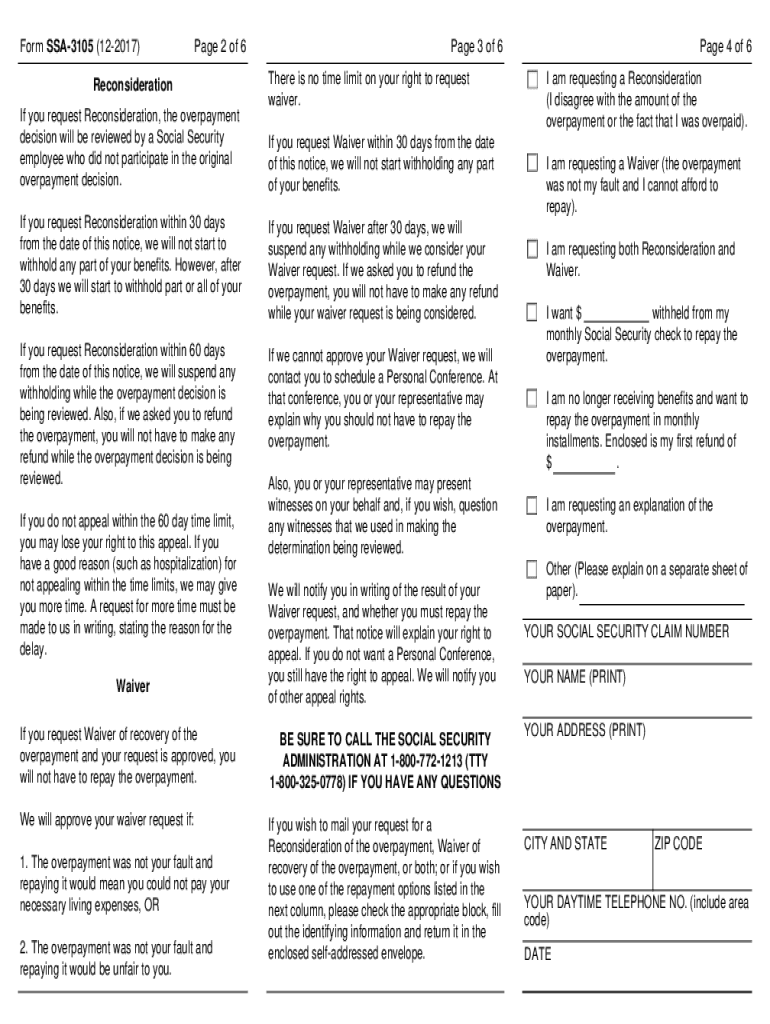
Return the Form SSA-3105 04-2013 If you request Reconsideration the participate in the original overpayment decision. from the date of this notice we will not start to withhold any part of your benefits. Privacy Act Statement - Collection and Use of Personal Information Sections 204 1631 b and 1870 of the Social Security Act as amended authorize us to collect this information* We will use the information you provide to make a determination on waiving overpayment recovery or changing your repayment rate. Furnishing us this information is voluntary. However failing to provide all or part of the information could prevent us from approving your request. We rarely use the information you supply for any purpose other than for determining a waiver or change in the repayment rate of an overpayment recovery. However we may also disclose information to another person or to another agency in accordance with approved routine uses which include but are not limited to the following 1. To enable a th....
Loading

Open form follow the instructions

Easily sign the form with your finger

Send filled & signed form or save
How to fill out the SSA-3105 online
This guide provides clear instructions for users on how to complete the SSA-3105 form online. Whether you are requesting a waiver for overpayment recovery or seeking a reconsideration, this step-by-step guide will assist you in filling out the necessary information accurately and efficiently.
Follow the steps to fill out the SSA-3105 online effectively.
- Press the ‘Get Form’ button to download the SSA-3105 form and open it in your preferred editor. This action will allow you to begin the process of filling out the form electronically.
- Review the Privacy Act Statement at the beginning of the form to understand how your information will be collected and used. This section outlines the importance of providing accurate information.
- Fill in your personal details, including your name, Social Security claim number, address, and daytime telephone number. Ensure that all information is accurate to avoid processing delays.
- In the section regarding the request for reconsideration or waiver, clearly indicate whether you are requesting a reconsideration, a waiver, or both. Be precise in your explanation of the overpayment issue.
- If applicable, specify any proposed deductions from your benefits to repay the overpayment, or indicate how you plan to repay if you are no longer receiving benefits.
- Double-check all entered information for accuracy. It's important to review your entries to prevent any mistakes that could impact your request.
- Once everything is complete, save your changes. You may chose to download, print, or share the completed form as needed for submission.
Take action today and fill out the SSA-3105 online to manage your Social Security overpayment effectively.
Experience a faster way to fill out and sign forms on the web. Access the most extensive library of templates available.
Related content
Form SSA-3105 (12-2017). Discontinue Prior Editions. Social Security Administration. Page...
Jul 11, 1994 - Purpose: To state the longstanding Social Security Administration (SSA)...
Use professional pre-built templates to fill in and sign documents online faster. Get access to thousands of forms.
If you believe that this page should be taken down, please follow our DMCA take down process here.