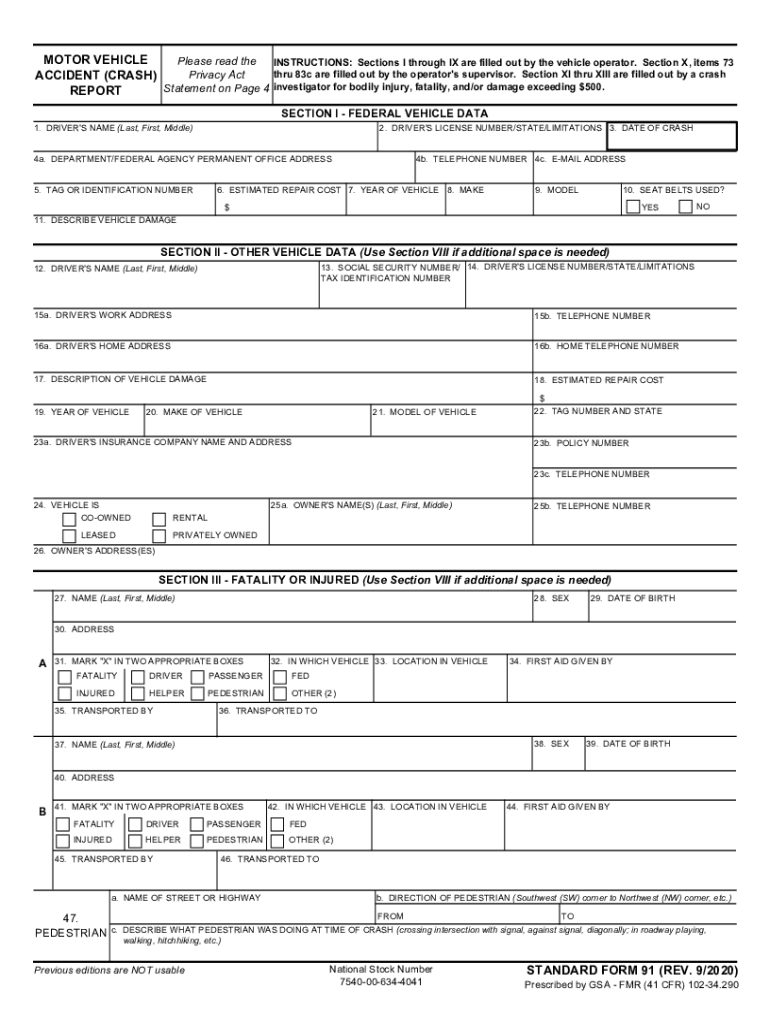
MOTOR VEHICLE ACCIDENT REPORT Please read the Privacy Act Statement on Page 3 INSTRUCTIONS Sections I through IX are filled out by the vehicle operator. SECTION XII - ATTACHMENTS 87. LIST ALL ATTACHMENTS TO THIS REPORT 88. REVIEWING OFFICIAL S COMMENTS SECTION XIII - COMMENTS/APPROVALS 89. ACCIDENT INVESTIGATOR a. SIGNATURE 90. ACCIDENT REVIEWING OFFICIAL b. DATE c. NAME First middle last d. TRANSPORTED TO a. NAME OF STREET OR HIGHWAY 47. Pedestrian b. DIRECTION OF PEDESTRIAN SW corner to NW corner etc. FROM TO c. DESCRIBE WHAT PEDESTRIAN WAS DOING AT TIME OF ACCIDENT crossing intersection with signal against signal diagonally in roadway playing walking hitchhiking etc. NSN 7540-00-634-4041 Previous edition not usable STANDARD FORM 91 2/2004 Prescribed by GSA-FMR 102-34. 295 SECTION IV - ACCIDENT TIME AND LOCATION Use section VII if additional space is needed. 48. DATE OF ACCIDENT 49. ITEM DAMAGED 64c. HOME TELEPHONE NUMBER 67. LOCATION OF DAMAGED ITEM 65c. POLICY NUMBER 68. ESTIMATED ....
Loading

Open form follow the instructions

Easily sign the form with your finger

Send filled & signed form or save
How to fill out the GSA SF 91 online
The GSA SF 91 is a crucial document used to report details of a motor vehicle accident involving federal vehicles. Understanding how to accurately complete this form online is important for ensuring compliance and proper documentation of the incident.
Follow the steps to effectively fill out the GSA SF 91 online.
- Click ‘Get Form’ button to obtain the form and open it in the editor.
- Begin with Section I, filling in the driver’s name (last, first, middle) and driver's license number, including state and any limitations. Record the date of the crash, department or federal agency, permanent office address, and vehicle identification number.
- In Section II, provide details on any other vehicles involved, including the driver’s name, social security number, license number and limitations, work and home addresses, and insurance company information.
- In Section III, document any fatalities or injuries. Record the sex, name, date of birth, address, and status of each injured person, including their location in the vehicle relevant to the crash.
- Proceed to Section IV to capture the crash time and location. Fill out the date, time (AM/PM), and address of the crash site, alongside a detailed description of the locality.
- Complete Section V with witness and passenger information, ensuring to include names and contact details.
- In Section VI, report property damage by providing the owner's name, the insurance company, and the estimated damage cost.
- Section VII requires police information. Fill in the officer's name, badge number, precinct or headquarters, and any persons charged with the crash.
- For Section VIII, enter any extra details or comments related to the crash, referring to specific sections and items for clarity.
- In Section X, include trip details during which the crash occurred: origin, destination, exact purpose of the trip, time of the trip, and compliance with established working hours.
- If applicable, Section XI will require details of any conflict during the investigation and any persons interviewed.
- Conclude with Sections XII and XIII for attachments, reviewing official comments, and any required signatures before saving the form.
- Upon completion, review the form carefully, and then save changes, download, print, or share the document as needed.
Get started on completing documents online today!
Experience a faster way to fill out and sign forms on the web. Access the most extensive library of templates available.
Related content
... SF91. Motor Vehicle Accident Report. U.S. Government Departments, Agencies, and...
(1) The manager of the GSA IFMS fleet management center issuing the vehicle; ... When...
Use professional pre-built templates to fill in and sign documents online faster. Get access to thousands of forms.
If you believe that this page should be taken down, please follow our DMCA take down process here.