Loading
Get Ca Llc-5 2020-2026
How it works
-

Open form follow the instructions
-

Easily sign the form with your finger
-

Send filled & signed form or save
How to fill out the CA LLC-5 online
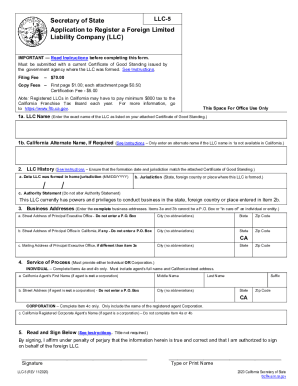
This guide provides a clear and detailed approach to completing the CA LLC-5, the Application to Register a Foreign Limited Liability Company in California. Users with little legal experience will find this step-by-step guide user-friendly and informative, ensuring a smooth completion of the form.
Follow the steps to fill out your CA LLC-5 online
- Click the ‘Get Form’ button to obtain the form in a fillable PDF format. This will allow you to fill out the necessary information directly in the document.
- Carefully read the instructions accompanying the form to understand the legal requirements for registering a foreign LLC in California.
- In Item 1a, enter the name of your LLC exactly as it appears on the attached Certificate of Good Standing. Ensure this name complies with California naming regulations.
- If the name does not comply, enter an alternate name in Item 1b that meets California requirements.
- In Item 2a, provide the date your LLC was formed using the MM/DD/YYYY format, matching the formation date on your Certificate of Good Standing. In Item 2b, specify the state or country of origin.
- In Item 3a, enter the complete physical address of your LLC’s Principal Executive Office, including street name and number, city, state, and zip code. Avoid using a P.O. Box.
- If applicable, provide the address for your Principal Office in California in Item 3b.
- In Item 4, designate an Agent for Service of Process by providing either the name and address of an individual agent in Items 4a and 4b or the name of a registered corporate agent in Item 4c.
- In Item 5, sign the form affirming the accuracy of the information. Note that electronic signatures are not acceptable; a wet signature is required.
- Once all fields are complete, ensure the document is saved in PDF format, and scan it to your computer.
- Upload the completed and signed PDF to submit your form electronically as instructed.
- After submission, watch for an email regarding the approval of your application or any required corrections.
Complete your CA LLC-5 online today for a hassle-free registration process.