Loading
Get Ca Cdph 8679 2017
How it works
-

Open form follow the instructions
-

Easily sign the form with your finger
-

Send filled & signed form or save
How to fill out the CA CDPH 8679 online
Navigating the process of filling out the CA CDPH 8679 can be straightforward with the right guidance. This guide provides clear, step-by-step instructions to help users complete the Home Medical Device Retailer License Application effectively.
Follow the steps to fill out the CA CDPH 8679 online
- Click ‘Get Form’ button to obtain the form and open it in the editor.
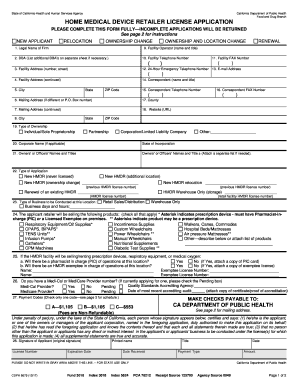
- Enter the legal name of the firm, which is the full name of your business, corporation, or organization applying for licensure.
- List any additional names under which your business operates in the DBA section.
- Fill in the facility address, including the number, street, city, state, and ZIP code.
- If your mailing address differs from the facility address, enter that information in the mailing address section.
- Identify the facility operator by entering their full name and title in the designated field.
- Provide the daytime telephone number for the facility.
- Fill in the facility FAX number.
- Enter the 24-hour emergency telephone number for the facility.
- Provide the facility email address.
- Enter the name and title of the correspondent, the person to contact about the application.
- Fill in the daytime telephone number and FAX number for the correspondent.
- State the county in which your facility is located.
- If applicable, provide the website URL for your business.
- Indicate the type of ownership by marking the appropriate box.
- If applicable, enter the corporate name and state of incorporation.
- List the names and titles of the owners or officers. Attach a separate list if needed.
- Select the type of application you are submitting by marking the appropriate box.
- Specify the type of business conducted at this location and include business days and hours.
- Indicate which products your business will be selling by marking all relevant boxes.
- For questions regarding prescription devices or respiratory equipment, mark your answers and provide any required additional information.
- Answer questions about Medi-Cal or Medicare Provider numbers and include any necessary details.
- Select the correct payment code for your license fee based on the category of your application.
- Sign the application to certify that the information provided is true and accurate, then print your name and title, and enter the date.
- Ensure to attach the necessary payment for the application and mail it to the specified address.
Complete your application online today to ensure a smooth licensing process.
Get form
Experience a faster way to fill out and sign forms on the web. Access the most extensive library of templates available.
Get This Form Now!
Use professional pre-built templates to fill in and sign documents online faster. Get access to thousands of forms.