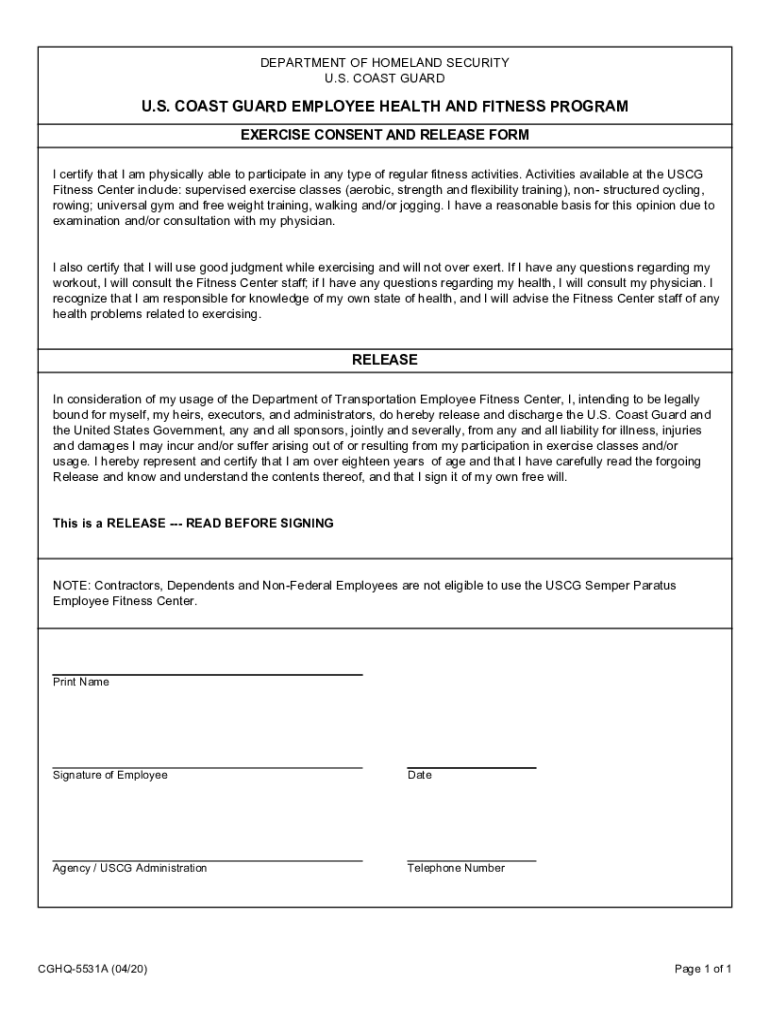
DEPARTMENT OF HOMELAND SECURITY U.S. COAST GUARDU.S. COAST GUARD EMPLOYEE HEALTH AND FITNESS PROGRAM EXERCISE CONSENT AND RELEASE FORM I certify that I am physically able to participate in any type.
Loading

Open form follow the instructions

Easily sign the form with your finger

Send filled & signed form or save
How to fill out the USCG CGHQ-5531A online
The USCG CGHQ-5531A is a crucial document for participants in the U.S. Coast Guard Employee Health and Fitness Program. This guide provides clear, step-by-step instructions on how to accurately complete the form online, ensuring that all requirements are met.
Follow the steps to successfully complete the USCG CGHQ-5531A form.
- Press the ‘Get Form’ button to access the document and open it in your preferred editor.
- Begin by entering your full name in the designated field labeled 'Print Name'. This is important as it identifies you as the individual completing the form.
- In the 'Signature of Employee' section, provide your signature to confirm that you agree with the terms laid out in the document.
- Next, fill in the 'Date' field with the current date on which you are completing the form.
- Indicate your agency or USCG administration by entering the relevant details in the corresponding field.
- Provide a contact telephone number in the space provided, ensuring that it is a current number where you can be reached.
- Lastly, review all entries for accuracy before finalizing the document. Once satisfied, you can save your changes, download, or print the completed form as needed.
Complete your USCG CGHQ-5531A form online today for a smooth and efficient experience.
Experience a faster way to fill out and sign forms on the web. Access the most extensive library of templates available.
Related content
Activities available at the USCG. Fitness Center include: supervised exercise classes...
Use professional pre-built templates to fill in and sign documents online faster. Get access to thousands of forms.
If you believe that this page should be taken down, please follow our DMCA take down process here.