Loading
Get Request To Reschedule §341 Meeting 2019
How it works
-

Open form follow the instructions
-

Easily sign the form with your finger
-

Send filled & signed form or save
How to fill out the Request To Reschedule §341 Meeting online
This guide provides clear, step-by-step instructions on how to successfully fill out the Request To Reschedule §341 Meeting form online. Whether you are new to this process or seeking clarification, this resource aims to simplify your experience and ensure all necessary information is properly submitted.
Follow the steps to complete your request for rescheduling the meeting online.
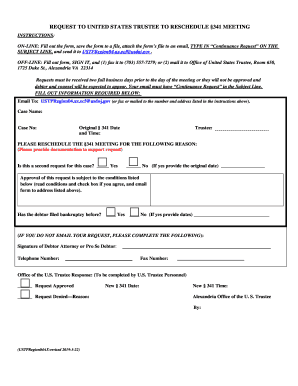
- Press the ‘Get Form’ button to access the Request To Reschedule §341 Meeting form and open it in your editor.
- Fill in the 'Email To' field with USTPRegion04.ax.ecf@usdoj.gov. Ensure this email is correctly entered to facilitate your submission.
- Provide the required information in the following fields: 'Case Name', 'Case No', 'Original § 341 Date and Time', and 'Trustee'. Make sure all details are accurate.
- In the section requesting a reason for rescheduling the §341 Meeting, clearly state your reason and attach any supporting documentation.
- Indicate whether this is a second request by checking 'Yes' or 'No'. If it is a second request, provide the original date.
- Acknowledge the approval conditions by reading each point carefully. Check the box to indicate your agreement with the conditions.
- If applicable, indicate whether the debtor has filed bankruptcy before. If yes, provide the relevant dates.
- If you are filling out the form offline, sign as the Debtor Attorney or Pro Se Debtor, and provide your telephone number and fax number. This step is not necessary for online submissions.
- Once the form is completed, save your changes, and prepare to attach the file to your email. Ensure the subject line reads 'Continuance Request'.
- Send your completed form via email to the U.S. Trustee at the provided email address.
Complete your documents online today for a smoother rescheduling process.
Get form
Experience a faster way to fill out and sign forms on the web. Access the most extensive library of templates available.
Get This Form Now!
Use professional pre-built templates to fill in and sign documents online faster. Get access to thousands of forms.