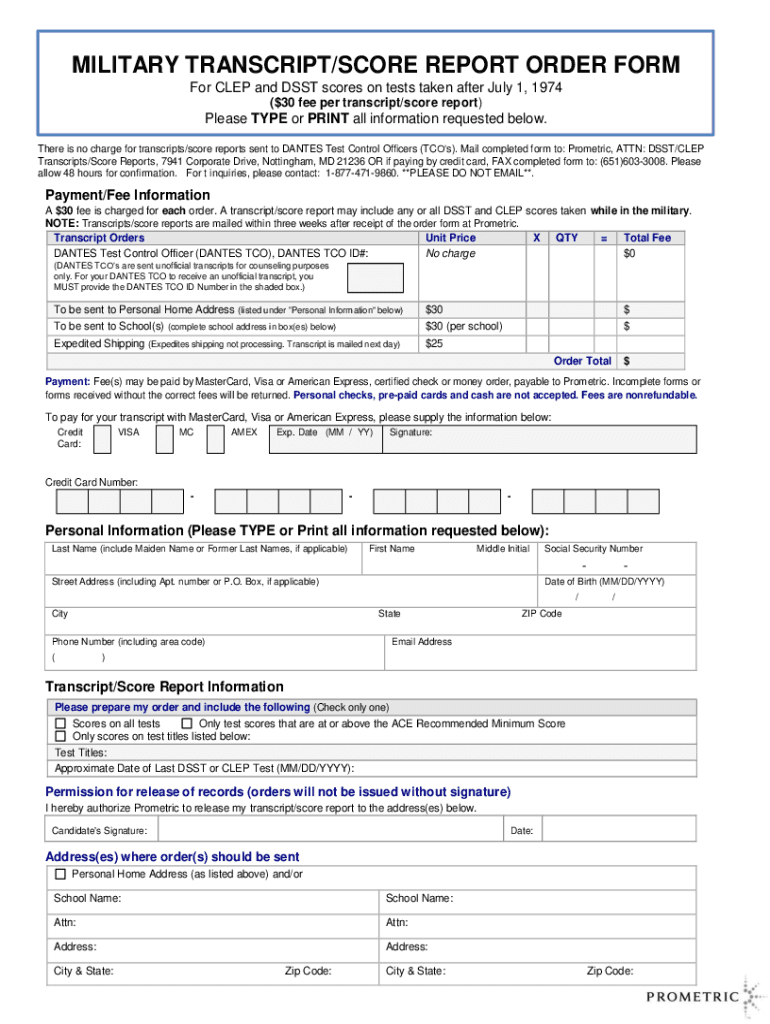
MILITARY TRANSCRIPT/SCORE REPORT ORDER FORM For CLEP and DSST scores on tests taken after July 1, 1974 ($30 fee per transcript/score report)Please TYPE or PRINT all information requested below. There.

Open form follow the instructions

Easily sign the form with your finger

Send filled & signed form or save
How to fill out the Prometric Military Transcript Order Form online
Filling out the Prometric Military Transcript Order Form online is a straightforward process that ensures you receive your scores efficiently. This guide provides step-by-step instructions to help you complete the form accurately and easily.
Follow the steps to fill out the Prometric Military Transcript Order Form online efficiently.
- Press the ‘Get Form’ button to obtain the Prometric Military Transcript Order Form and open it in your preferred editor.
- Begin by entering your personal information in the designated fields. Ensure to type or print your last name, first name, middle initial, and any former names if applicable.
- Provide your Social Security Number, street address (include apartment number or P.O. Box if necessary), city, state, ZIP code, phone number, date of birth, and email address.
- In the Transcript/Score Report Information section, select your order preference by checking only one option: all test scores, scores at or above the ACE recommended minimum score, or only specific test titles. If applicable, list the test titles and approximate date of last DSST or CLEP test.
- Move to the Payment/Fee Information section. Calculate the total fee by multiplying the unit price by the quantity ordered. Include any expedited shipping fees if you choose.
- If you are paying by credit card, fill in the credit card information, including card type, number, expiration date, and signature. Please note that personal checks and cash are not accepted.
- Sign the Permission for release of records section to authorize Prometric to release your transcripts/score reports. Include the date of signature.
- Finally, specify the addresses where the transcripts should be sent, indicating either your personal home address or school addresses, ensuring all details are accurate.
- Review all entered information for accuracy. Once completed, save changes, and proceed to download, print, or share the form as necessary.
Complete your Prometric Military Transcript Order Form online today to ensure prompt delivery of your scores.
Experience a faster way to fill out and sign forms on the web. Access the most extensive library of templates available.
Related content
The official website of the State of New York. Find information about state government...
Geisinger is a health and wellness organization focused on making better health easier for...
Use professional pre-built templates to fill in and sign documents online faster. Get access to thousands of forms.
If you believe that this page should be taken down, please follow our DMCA take down process here.