Loading
Get Uscis I-129f 2020-2026
How it works
-

Open form follow the instructions
-

Easily sign the form with your finger
-

Send filled & signed form or save
How to fill out the USCIS I-129F online
Filling out the USCIS I-129F form, also known as the Petition for Alien Fiancé(e), is an important step in the immigration process. This guide provides step-by-step instructions for completing the form online, ensuring that you have a smooth and efficient experience.
Follow the steps to fill out the form correctly.
- Click ‘Get Form’ button to obtain the form and open it in the editor.
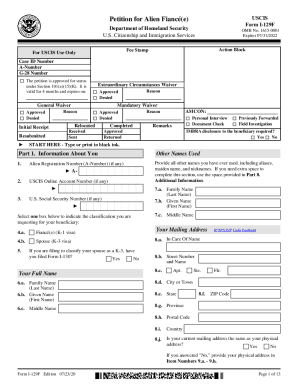
- Begin by entering 'Part 1. Information About You'. Fill in all requested details such as your other names used, alien registration number if applicable, and your U.S. Social Security number, if you have one. Be sure to also indicate the classification you're requesting for your beneficiary.
- Provide your full name, including family name, given name, and middle name. Then, enter your current mailing address. Ensure all information is accurate regarding your physical address as well.
- Next, input your employment history for the last five years. List your current employment first and complete the physical address section for each job held as instructed.
- Continue to fill out your personal details, including date of birth, marital status, and citizenship information. This information is critical for processing your petition.
- Proceed to 'Part 2. Information About Your Beneficiary'. Fill in the required fields including your beneficiary's name, date of birth, and mailing address.
- Document your beneficiary's employment and address history, as you did for yourself. Make sure to detail any previous marriages they may have had.
- Complete additional sections regarding any children under 18 years and your beneficiary's criminal history if applicable.
- In 'Part 5. Petitioner's Statement', certify that the information provided is true and sign where indicated. Ensure all areas are filled out correctly to avoid any delays.
- If an interpreter or preparer was used, complete 'Parts 6 and 7' with their details and signatures.
- Finally, review your information for accuracy. Once satisfied, you can save changes, download, print, or share the completed form as needed.
Start filling out your USCIS I-129F form online today to ensure a successful application process.