Loading
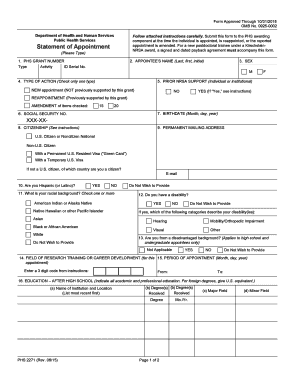
Get Hhs Phs 2271 2015
How it works
-

Open form follow the instructions
-

Easily sign the form with your finger
-

Send filled & signed form or save
How to fill out the HHS PHS 2271 online
The HHS PHS 2271 form is essential for appointing individuals as trainees or scholars under various research training and development programs. This guide will provide you with clear, step-by-step instructions to successfully complete the form online.
Follow the steps to fill out the HHS PHS 2271 form accurately.
- Click the ‘Get Form’ button to access the form and open it for editing.
- Complete Item 1 by entering the entire PHS Grant Number as shown on your Notice of Grant Award.
- In Item 2, enter the full name of the trainee, scholar, or participant as required.
- Fill out Item 3 by selecting the sex of the individual, marking either Male or Female.
- For Item 4, indicate the type of action being taken: New Appointment, Reappointment, or Amendment.
- Provide details for Item 5 regarding any prior NRSA support, if applicable.
- In Item 6, voluntarily enter the last four digits of the social security number to assist in identification.
- Input the birth date in Item 7 using the specified format.
- In Item 8, check the appropriate box for citizenship status and provide the relevant country if not a U.S. citizen.
- Complete Item 9 by providing a permanent mailing address for the appointee.
- For Items 10-13, provide information on race, ethnicity, disability, and disadvantaged background, as encouraged.
- Refer to the provided list to complete Item 14 with the numeric code that corresponds to the field of training.
- Specify the appointment period in Item 15, ensuring it meets the minimum duration requirements.
- Provide educational details in Item 16, listing all relevant degrees earned.
- If applicable, select the specialty board in Item 17 that relates to the appointment.
- Indicate Degrees Sought and expected completion in Items 18 and 19 if applicable.
- In Item 20, specify the total financial support anticipated from the grant during the appointment.
- Complete Item 21 regarding any delinquency on Federal debt, providing an explanation if necessary.
- In Item 22, enter the signature of the appointee confirming the accuracy of the information provided.
- Lastly, have the Program Director sign in Item 23 and provide their details.
- Review all entries for accuracy, then save, download, print, or share the completed form as needed.
Complete your HHS PHS 2271 form online today to ensure a smooth appointment process.
Get form
Experience a faster way to fill out and sign forms on the web. Access the most extensive library of templates available.
Get This Form Now!
Use professional pre-built templates to fill in and sign documents online faster. Get access to thousands of forms.