Loading
Get Dd Form 2131, Passenger Manifest, September 2005
How it works
-

Open form follow the instructions
-

Easily sign the form with your finger
-

Send filled & signed form or save
How to fill out the DD Form 2131, Passenger Manifest, September 2005 online
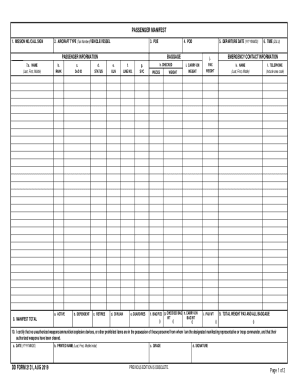
Filling out the DD Form 2131, Passenger Manifest, September 2005 online can simplify the process of documenting transportation details for personnel and their baggage. This guide provides clear instructions to ensure you complete the form efficiently and accurately.
Follow the steps to complete the DD Form 2131 online
- Click ‘Get Form’ button to access the form and open it in your online editor.
- Enter the mission number or call sign in the designated field. This number is crucial for identifying the specific mission associated with the passengers.
- Input the aircraft type (tail number), vehicle, or vessel information. This helps in keeping track of the transportation mode.
- Fill in the point of embarkation (POE) and point of debarkation (POD). These details are essential for understanding where the passengers are departing from and where they are headed.
- Provide the departure date in the format YYYYMMDD. Accurate date entry ensures the manifest aligns with travel schedules.
- In the passenger information section, list each passenger's full name (last, first, middle), rank, and Department of Defense (DoD) identification details. Classify passengers into active, dependent, retiree, or civilian status.
- Document the manifest total to reflect the number of passengers included in this manifest.
- Record baggage details including unit line number (ULN), service, and the number of checked and carry-on pieces per passenger. Ensure to include their respective weights.
- Input emergency contact information including the name and telephone number of the contact person for each passenger.
- At the bottom of the form, certify that all personnel do not possess unauthorized items by completing the certification statement with the date, printed name, grade, and signature.
- Once all fields are filled out, carefully review the information for accuracy. Save your changes, download, and print the completed form as needed.
Complete your documents online today for a more efficient process.
This includes the name, age, sex and occupation of the immigrant; the country of birth, last residence and the passenger list number. Also included is the name of the ship, and the date of its arrival in Boston.