We use cookies to improve security, personalize the user experience, enhance our marketing activities (including cooperating with our marketing partners) and for other business use.
Click "here" to read our Cookie Policy. By clicking "Accept" you agree to the use of cookies. Read less
Read more
Accept
Loading
Form preview
  • US Legal Forms
  • Form Library
  • More Forms
  • More Multi-State Forms
  • Blank Dd 2875 - Web.worth-avenue.com

Get Blank Dd 2875 - Web.worth-avenue.com

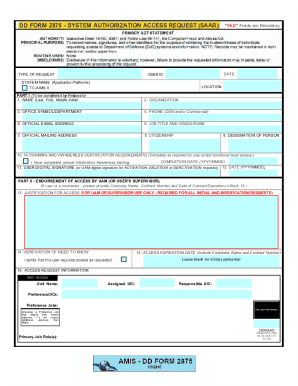
DD FORM 2875 SYSTEM AUTHORIZATION ACCESS REQUEST SAAR"RED" Fields are MandatoryPRIVACY ACT STATEMENT AUTHORITY: Executive Order 10450, 9397; and Public Law 99474, the Computer Fraud and Abuse Act. PRINCIPAL.

How it works

  1. Open form

    Open form follow the instructions

  2. Easily sign form

    Easily sign the form with your finger

  3. Share form

    Send filled & signed form or save

How to fill out the Blank DD 2875 - Web.worth-avenue.com online

Filling out the DD Form 2875, System Authorization Access Request, is a crucial step for users seeking access to various application platforms. This guide will provide you with a step-by-step approach to accurately complete the form online, ensuring that all necessary information is submitted for processing.

Follow the steps to successfully complete the DD Form 2875 online.

  1. Click the ‘Get Form’ button to access the DD Form 2875 online. This will open the form in the necessary editor, allowing you to begin filling out the required fields.
  2. In the ‘Type of Request’ section, select whether you are making an initial request, modification, deletion, activation, or deactivation.
  3. Fill in the date next to the ‘Type of Request’ to indicate when you are submitting this form.
  4. Complete the ‘User ID’ field with your unique system-generated identifier, if applicable.
  5. Provide the system name in the ‘System Name (Application Platforms)’ section, such as TC-AIMS II.
  6. Specify your location where you will be using the system in the provided field.
  7. In Part I, enter your full name in the format of Last, First, and Middle Initial.
  8. Input your organization’s name in the relevant field.
  9. Fill out your office symbol or department, phone number (both DSN and/or commercial), official email address, job title, and grade/rank.
  10. Complete the official mailing address, citizenship status, and designation of person (military, civilian, contractor).
  11. Indicate whether you have completed the IA training and awareness certification requirements and provide the completion date.
  12. Affix your digital signature in the appropriate field, confirming all details are correct, and enter the date.
  13. After completing Part I, submit the form to your User Account Manager (UAM) for endorsement in Part II.
  14. In Part II, the UAM or supervisor must justify the access request, verify the need to know, and provide signature and date.
  15. For Security Manager validation, Part III needs to be filled with the type and date of investigation, clearance level, and the manager’s signature and date.
  16. Part IV is completed by authorized staff for final approval and account creation, including additional signatures and dates.
  17. Finally, ensure all fields are filled, save the form changes, and choose to download, print, or share the completed form as needed.

Start filling out your DD Form 2875 online today to ensure timely processing of your access requests.

Get form

Experience a faster way to fill out and sign forms on the web. Access the most extensive library of templates available.
Get form

Related content

Tri-Service Food Code - Army Publishing...
Mar 1, 2019 — value that is already assigned to an existing section within the TSFC are...
Learn more
Autonomous Horizons: The Way Forward - Air...
AFRL, including the DOD Autonomy Community of Interest. (COI), AFWERX, and ... the...
Learn more
Electronic Controls Design E51-0386-40 Super...
FAX: +(1) 503.659.4422. Email: ecd@ecd.com. Internet: http://www.ecd.com ... may not be...
Learn more

Related links form

Simple Tree Trimming Form Chemical Waste Disposal Form - Warwickshire County Council SNAP Allergy MAP Updated 17 Apr 09 2 2.doc I Ready Scale Score Placement Tables 2019 2020

Questions & Answers

Get answers to your most pressing questions about US Legal Forms API.

Contact support

The intended use of IT Levels (box 28c) on the Department of Defense SAAR form (DD 2875) documents the level of access necessary to perform assigned duties based on the sensitivity of the position while maintaining least privilege. The user's supervisor or program sponsor is responsible for completing box 28c.

FILING: Original SAAR, with original signatures in Parts I, II, and III, must be maintained on file for one year after termination of user's account. File may be maintained by the DoD or by the Customer's IAO.

As an adoptable form, the DD Form 2875, can be used to request and adjudicate system authorization and access requests across the Department of Defense. 2. DISA is the office of primary responsibility for the DD Form 2875.

0:17 2:32 Learn How to Fill the DD 2875 Form System Authorization Access Request YouTube Start of suggested clip End of suggested clip Once part 1 is completed. Part 2 must be filled out by the system administrating agency orMoreOnce part 1 is completed. Part 2 must be filled out by the system administrating agency or sponsoring party the justification. For access must be provided in box 13. A brief explanation is required.

1. The DD Form 2875 is an adoptable form. As an adoptable form, the DD Form 2875, can be used to request and adjudicate system authorization and access requests across the Department of Defense.

0:17 2:32 Learn How to Fill the DD 2875 Form System Authorization Access Request YouTube Start of suggested clip End of suggested clip Once part 1 is completed. Part 2 must be filled out by the system administrating agency orMoreOnce part 1 is completed. Part 2 must be filled out by the system administrating agency or sponsoring party the justification. For access must be provided in box 13. A brief explanation is required.

The intended use of IT Levels (box 28c) on the Department of Defense SAAR form (DD 2875) documents the level of access necessary to perform assigned duties based on the sensitivity of the position while maintaining least privilege. The user's supervisor or program sponsor is responsible for completing box 28c.

All new users will need to file a DD Form 2875, a User Agreement, a copy of the user's DoD Cyber Awareness Challenge certificate, and the DPAS Security roles form to receive access to the system. If a DPAS account has been deleted due to inactivity, all three forms must be completed as new and resubmitted.

Get This Form Now!

Use professional pre-built templates to fill in and sign documents online faster. Get access to thousands of forms.
Get form
If you believe that this page should be taken down, please follow our DMCA take down processhere.

Industry-leading security and compliance

US Legal Forms protects your data by complying with industry-specific security standards.
  • In businnes since 1997
    25+ years providing professional legal documents.
  • Accredited business
    Guarantees that a business meets BBB accreditation standards in the US and Canada.
  • Secured by Braintree
    Validated Level 1 PCI DSS compliant payment gateway that accepts most major credit and debit card brands from across the globe.
Get Blank Dd 2875 - Web.worth-avenue.com
Get form
Form Packages
Adoption
Bankruptcy
Contractors
Divorce
Home Sales
Employment
Identity Theft
Incorporation
Landlord Tenant
Living Trust
Name Change
Personal Planning
Small Business
Wills & Estates
Packages A-Z
Form Categories
Affidavits
Bankruptcy
Bill of Sale
Corporate - LLC
Divorce
Employment
Identity Theft
Internet Technology
Landlord Tenant
Living Wills
Name Change
Power of Attorney
Real Estate
Small Estates
Wills
All Forms
Forms A-Z
Form Library
Customer Service
Terms of Service
Privacy Notice
Legal Hub
Content Takedown Policy
Bug Bounty Program
About Us
Help Portal
Legal Resources
Blog
Affiliates
Contact Us
Delete My Account
Site Map
Industries
Forms in Spanish
Localized Forms
State-specific Forms
Forms Kit
Legal Guides
Real Estate Handbook
All Guides
Prepared for You
Notarize
Incorporation services
Our Customers
For Consumers
For Small Business
For Attorneys
Our Sites
US Legal Forms
USLegal
FormsPass
pdfFiller
signNow
airSlate WorkFlow
DocHub
Instapage
Social Media
Call us now toll free:
+1 833 426 79 33
As seen in:
  • USA Today logo picture
  • CBC News logo picture
  • LA Times logo picture
  • The Washington Post logo picture
  • AP logo picture
  • Forbes logo picture
© Copyright 1997-2025
airSlate Legal Forms, Inc.
3720 Flowood Dr, Flowood, Mississippi 39232
Form Packages
Adoption
Bankruptcy
Contractors
Divorce
Home Sales
Employment
Identity Theft
Incorporation
Landlord Tenant
Living Trust
Name Change
Personal Planning
Small Business
Wills & Estates
Packages A-Z
Form Categories
Affidavits
Bankruptcy
Bill of Sale
Corporate - LLC
Divorce
Employment
Identity Theft
Internet Technology
Landlord Tenant
Living Wills
Name Change
Power of Attorney
Real Estate
Small Estates
Wills
All Forms
Forms A-Z
Form Library
Customer Service
Terms of Service
Privacy Notice
Legal Hub
Content Takedown Policy
Bug Bounty Program
About Us
Help Portal
Legal Resources
Blog
Affiliates
Contact Us
Delete My Account
Site Map
Industries
Forms in Spanish
Localized Forms
State-specific Forms
Forms Kit
Legal Guides
Real Estate Handbook
All Guides
Prepared for You
Notarize
Incorporation services
Our Customers
For Consumers
For Small Business
For Attorneys
Our Sites
US Legal Forms
USLegal
FormsPass
pdfFiller
signNow
airSlate WorkFlow
DocHub
Instapage
Social Media
Call us now toll free:
+1 833 426 79 33
As seen in:
  • USA Today logo picture
  • CBC News logo picture
  • LA Times logo picture
  • The Washington Post logo picture
  • AP logo picture
  • Forbes logo picture
© Copyright 1997-2025
airSlate Legal Forms, Inc.
3720 Flowood Dr, Flowood, Mississippi 39232