Loading
Form preview
  • US Legal Forms
  • Other Templates
  • More Forms
  • More Multi-State Forms
  • Publication 957 - Internal Revenue Service

Get Publication 957 - Internal Revenue Service

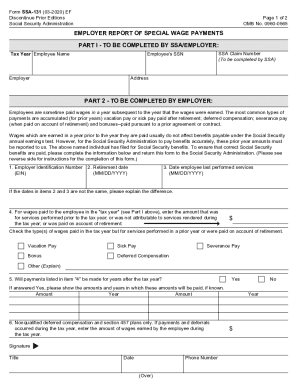
Form SSA131 (032020) EF Discontinue Prior Editions Social Security AdministrationPage 1 of 2 OMB No. 09600565EMPLOYER REPORT OF SPECIAL WAGE PAYMENTS PART I TO BE COMPLETED BY SSA/EMPLOYER: Tax Year.

This website is not affiliated with any governmental entity

How it works

  1. Open form

    Open form follow the instructions

  2. Easily sign form

    Easily sign the form with your finger

  3. Share form

    Send filled & signed form or save

How to fill out the Publication 957 - Internal Revenue Service online

Filling out the Publication 957 - Internal Revenue Service online can be straightforward, provided you follow the correct steps. This guide aims to walk you through each section of the form to ensure accurate and efficient completion.

Follow the steps to fill out the publication 957 accurately.

  1. Press the ‘Get Form’ button to obtain the form and open it in the editor.
  2. Begin by entering the tax year as requested in Part I of the form. Make sure this corresponds to the actual year you are reporting.
  3. Provide the employee's name as it appears on their Social Security card.
  4. Enter the SSA claim number, which is required for the Social Security Administration to process the information.
  5. Input the employee's Social Security number (SSN). This must match the number on the employee's Social Security card.
  6. Fill in the employer's name and complete the address section accurately.
  7. In Part 2, complete the Employer Identification Number (EIN) used for reporting wages on Form W-2.
  8. Enter the retirement date of the employee. If not applicable, indicate 'Not Retired.'
  9. Provide the date the employee last performed services. Ensure this date is the same as or earlier than the retirement date, if applicable.
  10. Detail the wages paid to the employee during the tax year for services performed in prior years or paid upon retirement.
  11. Check all applicable types of wages paid during the tax year, such as vacation pay or severance pay, and provide explanations if necessary.
  12. Answer whether payments listed will continue in future years and provide amounts and years if known.
  13. For nonqualified deferred compensation, enter the wages earned during the tax year if applicable.
  14. Add your signature, title, and date in the designated areas at the end of the form.
  15. Save your changes and then download, print, or share the completed form as needed.

Take the first step towards accurate reporting — complete your forms online today!

Get form

Experience a faster way to fill out and sign forms on the web. Access the most extensive library of templates available.
Get form

Related content

About Publication 957, Reporting Back Pay and...
Jan 26, 2021 — Publication 957 discusses back pay under a statute and special wage...
Learn more
Publication 957 (Rev. June 2005) - Uncle Fed's...
The Internal Revenue Service (IRS) and the SSA con- those listed above also may qualify as...
Learn more
2017 General Instructions for Forms W-2 and W-3...
May 2, 2017 — recognized for federal tax purposes if the marriage is recognized by the...
Learn more

Related links form

Nguzo Mama SNEHBANDHAN CHARITABLE TRUST APPLICATION FORM FOR ... NSTC 1533/135 (04-17) - NROTC Scholarship ... - Public.Navy.mil Pnp Job Application Form

Questions & Answers

Get answers to your most pressing questions about US Legal Forms API.

Contact support

However, for income tax purposes, the IRS treats all back pay as wages in the year paid. Employers should use Form W-2, Wage and Tax Statement, or electronic wage reports to report back pay as wages in the year they actually pay the employee.

You can use the percentage method if you give retroactive pay on its own. Under the percentage method, withhold a flat 22% for federal income taxes. Use the aggregate method if you add the employee's retro pay to their regular wages for the following period.

Submit Form SSA-131 to the SSA office nearest your place of business. Or, the employee can submit it to the SSA office handling the claim. You or the employee must submit this form before the SSA can exclude the special wage payments for purposes of the earnings test.

The U.S. Supreme Court has ruled that awards of back wages to employees are subject to federal taxation according to the year in which the wages are actually paid, not the year in which the wages should have been paid or were actually earned.

Just like with normal pay, you need to withhold Social Security, Medicare, and applicable state and local taxes from retroactive pay. Income tax is where it's a little different for retroactive pay. The IRS considers retroactive wages supplemental wages, or money paid to an employee outside their normal salary.

SSDI back pay is the amount of money that the SSDI owes you from the delay caused by their processing time. ... Retroactive pay is a period of up to one year prior to your application date for which the SSA will pay you SSDI benefits, assuming that you were eligible at that time.

Generally, an amount included in your income is taxable unless it is specifically exempted by law. Income that is taxable must be reported on your return and is subject to tax. Income that is nontaxable may have to be shown on your tax return but is not taxable.

SSA stores some of the W-2 information as administrative data; most of it is sent to the IRS . The W-3 is a summary form that contains aggregate earnings information for all employees in the wage report.

Even if you don't file a tax return, the IRS can still find you from data they collect from third-party bank and credit info.

It is not taxed at a higher rate, it was withheld at a higher rate because payroll software thinks you make that much money every single pay period. You will get any overpayment back when you file your tax return next year; you don't actually pay more taxes.

Get This Form Now!

Use professional pre-built templates to fill in and sign documents online faster. Get access to thousands of forms.
Get form
If you believe that this page should be taken down, please follow our DMCA take down processhere.
Get Publication 957 - Internal Revenue Service
Get form
  • Adoption
  • Bankruptcy
  • Contractors
  • Divorce
  • Home Sales
  • Employment
  • Identity Theft
  • Incorporation
  • Landlord Tenant
  • Living Trust
  • Name Change
  • Personal Planning
  • Small Business
  • Wills & Estates
  • Packages A-Z
  • Affidavits
  • Bankruptcy
  • Bill of Sale
  • Corporate - LLC
  • Divorce
  • Employment
  • Identity Theft
  • Internet Technology
  • Landlord Tenant
  • Living Wills
  • Name Change
  • Power of Attorney
  • Real Estate
  • Small Estates
  • Wills
  • All Forms
  • Forms A-Z
  • Other Templates
  • Legal Hub
  • About Us
  • Help Portal
  • Legal Resources
  • Blog
  • Affiliates
  • Contact Us
  • Delete My Account
  • Site Map
  • Industries
  • Forms in Spanish
  • Localized Forms
  • State-specific Forms
  • Forms Kit
  • Real Estate Handbook
  • All Guides
  • Notarize
  • Incorporation services
  • For Consumers
  • For Small Business
  • For Attorneys
  • USLegal
  • FormsPass
  • pdfFiller
  • signNow
  • altaFlow
  • DocHub
  • Instapage
Form Packages
  • Adoption
  • Bankruptcy
  • Contractors
  • Divorce
  • Home Sales
  • Employment
  • Identity Theft
  • Incorporation
  • Landlord Tenant
  • Living Trust
  • Name Change
  • Personal Planning
  • Small Business
  • Wills & Estates
  • Packages A-Z
Form Categories
  • Affidavits
  • Bankruptcy
  • Bill of Sale
  • Corporate - LLC
  • Divorce
  • Employment
  • Identity Theft
  • Internet Technology
  • Landlord Tenant
  • Living Wills
  • Name Change
  • Power of Attorney
  • Real Estate
  • Small Estates
  • Wills
  • All Forms
  • Forms A-Z
  • Other Templates
Customer Service
  • Legal Hub
  • About Us
  • Help Portal
  • Legal Resources
  • Blog
  • Affiliates
  • Contact Us
  • Delete My Account
  • Site Map
  • Industries
  • Forms in Spanish
  • Localized Forms
  • State-specific Forms
  • Forms Kit
Legal Guides
  • Real Estate Handbook
  • All Guides
Prepared for you
  • Notarize
  • Incorporation services
Our Customers
  • For Consumers
  • For Small Business
  • For Attorneys
Our Sites
  • USLegal
  • FormsPass
  • pdfFiller
  • signNow
  • altaFlow
  • DocHub
  • Instapage
Social Media
Call us now toll free:
+1 833 426 79 33
As seen in:
© Copyright 1999-2026 airSlate Legal Forms, Inc. 17 Station Street, Ste. 203, Brookline, MA 02445
  • Your Privacy Choices
  • Terms of Service
  • Privacy Notice
  • Content Takedown Policy
  • Bug Bounty Program