Loading
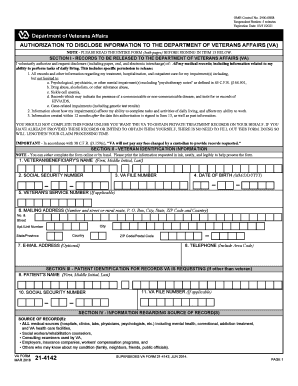
Get Note - Please Read The Entire Form (both Pages) Before Signing In Item 13 Below
How it works
-

Open form follow the instructions
-

Easily sign the form with your finger
-

Send filled & signed form or save
How to fill out the NOTE - PLEASE READ THE ENTIRE FORM (both Pages) BEFORE SIGNING IN ITEM 13 BELOW online
This guide provides clear instructions to help users fill out the NOTE - PLEASE READ THE ENTIRE FORM (both Pages) BEFORE SIGNING IN ITEM 13 BELOW online. By following these steps, you can ensure the accurate completion of the form necessary for the Department of Veterans Affairs.
Follow the steps to fill out the form accurately and efficiently.
- Click the ‘Get Form’ button to obtain the form and open it in your web browser.
- Begin with Section I, where you need to provide authorization for releasing your records. Ensure to check the information you are consenting to disclose, which includes all medical records as stated.
- In Section II, accurately fill in your veteran identification information, including your name, date of birth, social security number, VA file number, service number, mailing address, email address, and telephone number.
- If applicable, complete Section III by filling in the patient identification information for records that are not for your use. This section requests the patient's name and their social security number.
- Proceed to Section IV where you will specify all information sources. List all medical sources that may have relevant information regarding your treatment, such as hospitals and doctors.
- In Section V, indicate whether there are any limitations on your consent to release information. If there are no limitations, leave the space blank.
- Sign in Item 13 to authorize the release. Your signature must be in ink if the form is printed. Fill in the date you completed the form in Item 14.
- In Item 15, print your name clearly, and in Item 16, indicate your relationship to the veteran or claimant if you are not the veteran themselves.
- Review all information for accuracy before submission. After confirming the information is correct, save changes, and download or print the form for your records.
- Finally, submit the completed form to the appropriate authority as specified, ensuring your authorization remains valid.
Complete your forms online now to ensure a smooth processing of your information.
Your A-Number is the number used to identify your immigration records. It begins with an "A" and can be found on correspondence you have received from the Department of Homeland Security (DHS) or USCIS. Item Number 10. Immigration Status.