Loading
Get Gsa 12002 2019-2026
How it works
-

Open form follow the instructions
-

Easily sign the form with your finger
-

Send filled & signed form or save
How to fill out the GSA 12002 online
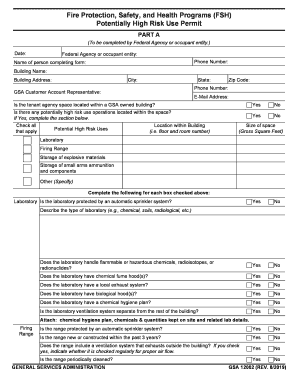
This guide provides a comprehensive overview on how to accurately complete the GSA 12002 form online. By following the steps outlined below, users can ensure that they provide the necessary information for their fire protection, safety, and health programs.
Follow the steps to complete the GSA 12002 effectively.
- Click ‘Get Form’ button to obtain the form and open it in the editor.
- Fill in the 'Date' field to indicate when the form is being completed.
- Enter the 'Federal Agency or occupant entity' name responsible for the application.
- Provide the 'Phone Number' of the agency or entity for communication purposes.
- Complete the 'Name of person completing form' field with the individual's name.
- Fill in the 'Building Name' where the operations will take place.
- Input the 'Building Address' including the street number and name.
- Specify the 'City', 'State', and 'Zip Code' where the building is located.
- List the 'Phone Number' and 'E-Mail Address' for further correspondence.
- Answer the question regarding whether the tenant agency space is within a GSA owned building by selecting 'Yes' or 'No'.
- Indicate if there are any potentially high risk use operations in the space by selecting 'Yes' or 'No'. If 'Yes', proceed to complete the relevant section.
- For each high risk use, specify the location within the building (e.g., floor and room numbers) and check all applicable types of high risk uses.
- Input the 'Size of space' in gross square feet for the high risk use.
- If 'Laboratory' is checked, respond to the subsequent questions regarding safety features such as an automatic sprinkler system and handling of hazardous materials.
- Provide a description of the laboratory's type and attach any necessary documents such as a chemical hygiene plan.
- If 'Firing Range' is checked, answer questions regarding safety systems and maintenance procedures.
- Indicate if the range ventilation system is functioning properly.
- If 'Explosive Materials Storage' is checked, complete the required safety questions and provide details about the storage location.
- Describe any high risk uses and check if an automated sprinkler system is in place.
- Fill out the appropriate sections in PART B if applicable, indicating approval status and providing supervisor details.
- Once all sections are completed, review the information for accuracy. You can then save changes, download, print, or share the form as needed.
Complete your GSA 12002 form online for efficient processing and compliance.
Related links form
The General Services Administration manages federal property and provides contracting options for government agencies.