Loading
Get Mt Financial Data For Informa Pauperis Application 2018-2026
How it works
-

Open form follow the instructions
-

Easily sign the form with your finger
-

Send filled & signed form or save
How to fill out the MT Financial Data For Informa Pauperis Application online
This guide provides clear and concise instructions on completing the MT Financial Data For Informa Pauperis Application online. It is designed to assist users in accurately filling out each section, ensuring a smooth process.
Follow the steps to complete your application effectively.
- Press the ‘Get Form’ button to access the application form and open it for editing.
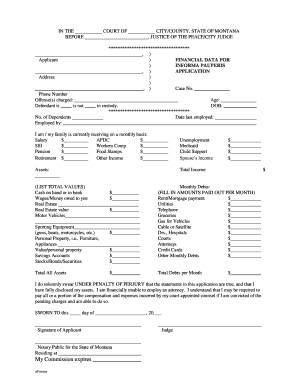
- Begin by entering your name in the 'Applicant' section, along with your address and phone number. This information is crucial for any follow-up regarding your application.
- Fill in the 'Offense(s) charged' field with the relevant charges you are facing. This helps the court understand the context of your application.
- Indicate whether the defendant is currently in custody and provide the number of dependents, if applicable. This information can affect financial assessments.
- Complete the section on employment status, including your current employer (if applicable), age, date of birth, and date last employed. These details help assess your financial situation.
- List all sources of monthly income, such as salary, public assistance, child support, or other income streams. Ensure you provide the exact amounts for each type of income.
- Detail your assets by listing items such as cash, real estate, motor vehicles, and personal property. Be sure to provide the total value of each asset.
- Document your monthly debts by providing the amounts you pay for rent/mortgage, utilities, and other expenses. Accurately reflecting your financial obligations is vital.
- Calculate the total debts and total assets, and make sure these sums are clearly noted in the respective sections.
- Review all entered information for accuracy. Ensure that you have fully disclosed your assets and the details are correct.
- Finally, complete the affirmation statement by signing the application. Include the date and provide a notary public signature if required.
- Once completed, you can save your changes, download the application, print it for submission, or share it as needed.
Complete your MT Financial Data For Informa Pauperis Application online today!
Related links form
33 of the Code of Civil Procedure negative the idea of anybody but an actual pauper, a real pauper, a man without means, being permitted to maintain or defend a suit in forma pauperis and that the privilege of maintaining a pauper suit is a personal privilege granted to people who have no means of carrying on or ...