Loading
Get Usphs Fitness Test
How it works
-

Open form follow the instructions
-

Easily sign the form with your finger
-

Send filled & signed form or save
How to fill out the Usphs Fitness Test online
This guide provides clear, step-by-step instructions on how to complete the Usphs Fitness Test online. By following the outlined steps, users will be able to navigate the process with confidence.
Follow the steps to successfully complete the Usphs Fitness Test online.
- Click ‘Get Form’ button to obtain the form and open it in the editor.
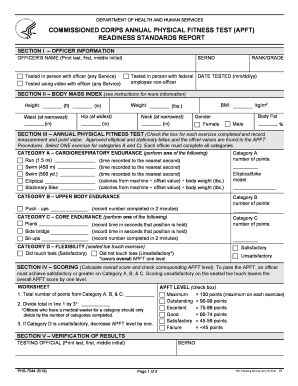
- In Section I, enter the officer's name, serial number, rank/grade, and date tested. Select whether the test was conducted in person or via video.
- For Section II, input height, weight, waist, hip, neck measurements, gender, and calculate body mass index (BMI) using the provided formula.
- In Section III, record the chosen cardio exercise results under Category A and append time or calories burned as specified. Complete Category B by recording the number of push-ups completed in two minutes. For Category C, input results for the chosen core endurance exercise.
- In Section D, indicate the result of the flexibility test by checking either ‘Satisfactory’ or ‘Unsatisfactory’.
- Complete Section IV by calculating the overall score from Categories A, B, and C, and adjust the score based on the outcome of Category D.
- In Section V, ensure both the testing official and the officer sign and provide their email addresses.
- Save the completed form, ensuring to keep a copy for personal records. After completion, consider the necessary steps for sharing or submitting the form as per specific requirements.
Begin filling out the Usphs Fitness Test online today to ensure compliance with required standards.
1 Minute Sit Up Test (Men) Age18-2526-35Excellent>49>45Good44-4940-45Above average39-4335-39Average35-3831-343 more rows